How Do I Use a Coupon at VRBO?
VRBO does not offer coupons for guests. However, guests can access 20% off new listings through a dedicated page — and hosts can redeem coupons toward an annual subscription during signup.
Last verified:
Step 1 of 1 for guests – 3 steps for hosts
Which describes you?
Your path depends on whether you’re booking a stay or listing your home.
Choose below to jump to the right instructions.
| You Are | Coupon Available? | Best Way to Save |
|---|---|---|
| Guest booking a stay | No coupons | Use the 20% off new listings page |
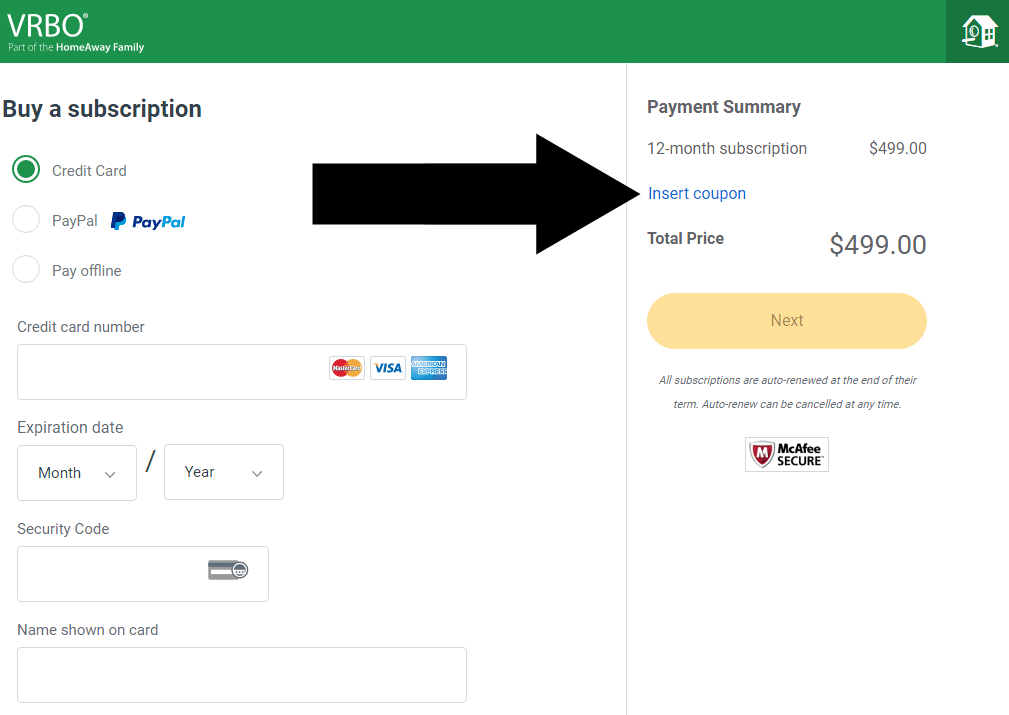
| Host setting up a new listing | Yes | Redeem at Payment Summary Insert Coupon |
For Guests
Save 20% on New VRBO Listings
How the 20% discount works
VRBO doesn’t have a coupon code field for guests. Instead, the discount is applied automatically when you browse through the dedicated new listings page. You’ll see eligible properties marked with the discount in your search results.
Only applies to newly listed properties (limited inventory)
Properties may have few or no reviews yet
Discount is applied automatically — no code needed
Availability varies by location and travel dates
OFF NEW
LISTINGS
For Hosts · 3 Steps · ~5 Minutes
How to Redeem Your VRBO Host Coupon
VRBO occasionally offers coupons to new hosts setting up their first listing.
Follow these steps during the signup process to redeem your code.
WHAT YOU’LL NEED
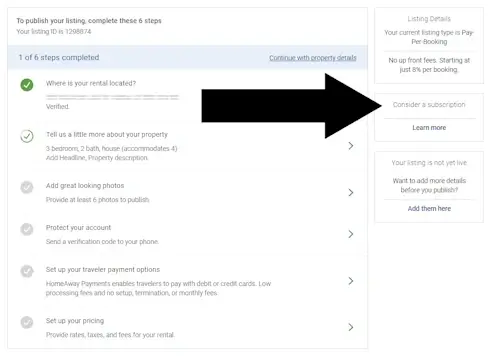
1 Tap ‘Consider a Subscription’
During the VRBO host signup process, you’ll be prompted about listing options. Click “Consider a subscription” — this is the path that leads to the coupon redemption field.
2 Choose Annual Subscription
3 Enter Your Coupon at Payment Summary
UNDERSTANDING COSTS
VRBO Fees Explained
VRBO charges a service fee on top of the rate set by the homeowner. Here’s what to expect — and why a coupon (if it were available for guests) wouldn’t save as much as you might think.
SERVICE FEE RANGE
6-15%
Added on top of the owner’s rental price. You’ll see the exact amount in your payment summary before confirming.
WHAT IT’S BASED ON
Rental cost
Calculated on the rental price only — not on taxes or refundable deposits.
COMPARED TO COMPETITORS
Similar
Airbnb and Booking.com charge comparable service fees. Always compare the total cost before booking.
Tips to Minimize VRBO Fees
Choose new listings
Newly listed properties often come with the 20% discount, which effectively reduces your total cost more than any service fee coupon would.
Book longer stays
Extended rentals sometimes come with lower effective service fee percentages. Check the payment breakdown before booking.
Travel off-peak
Midweek or off-season bookings often have lower rental rates set by the owner, which reduces the service fee in absolute terms.
Troubleshooting
Coupon Not Working?
Here are the most common reasons a VRBO coupon may not apply — and how to fix each one.
The “Insert Coupon” field isn’t visible
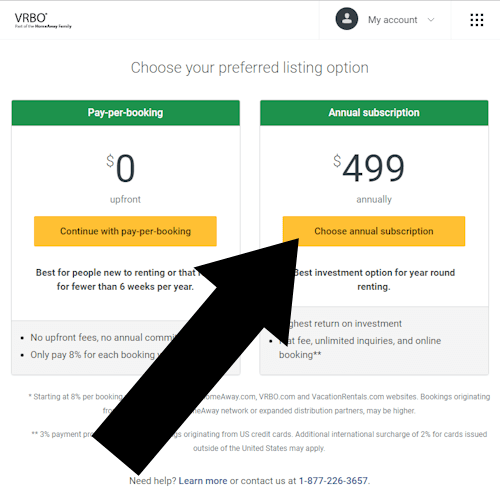
You may have selected “Pay-per-booking” in Step 2. Go back and choose “Annual Subscription” — the coupon field only appears on that plan.
The coupon code returns an error
Check that the code hasn’t expired and that you’re applying it to a new first-time listing. VRBO host coupons are generally single-use and new-listing only.
The 20% guest discount isn’t showing
The discount is inventory-based. If no new listings are available in your destination for your dates, the discount won’t appear. Try adjusting your dates or location.
You completed payment before entering the coupon
Unfortunately, VRBO does not allow retroactive coupon application. Contact VRBO support directly — they may offer an exception in certain cases.
Related Guides: