
Where Do You Enter a Priceline Promo Code?
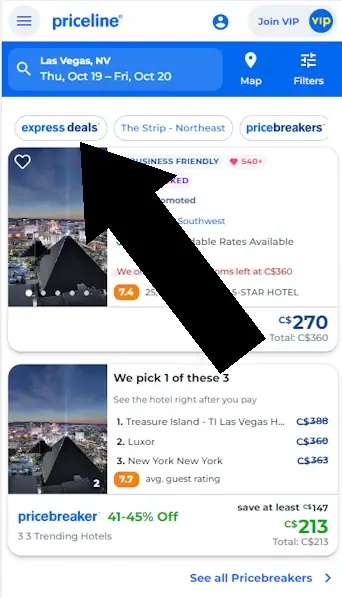
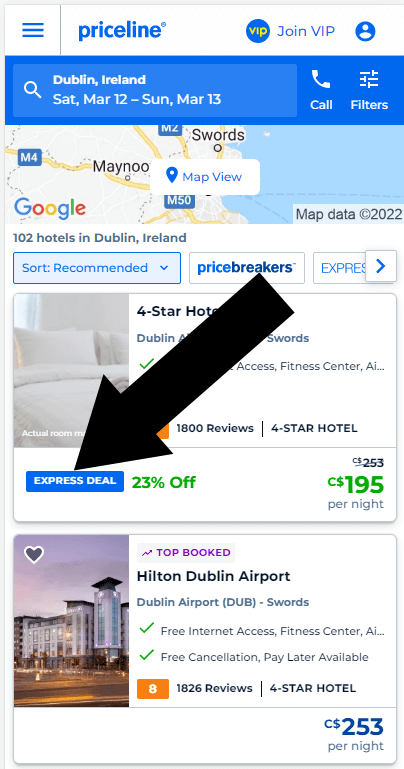
Coupons on Priceline can only be applied to deals marked "Express Deals". The search for Express Deals can be done by narrowing down the search using filters as described below.
Disclosure: We may earn a commission if you complete a purchase on priceline.com after using our guide. This never affects the steps, accuracy, or recommendations we publish. All information is based on independent testing and research conducted on .
How to use a Priceline Hotel coupon
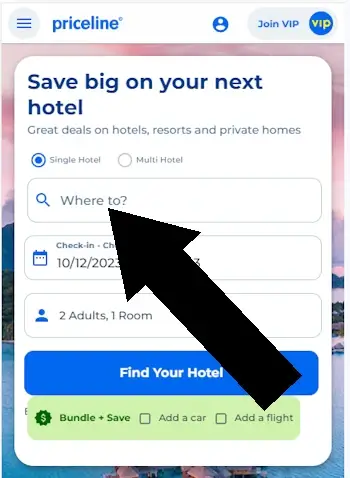
Step 1
From the homepage, search for your accommodation.
Step 2
Narrow your search to EXPRESS DEALS.
Step 3
Pick a hotel flagged EXPRESS DEAL.
How to use a Priceline Bundle Coupon
Step 1
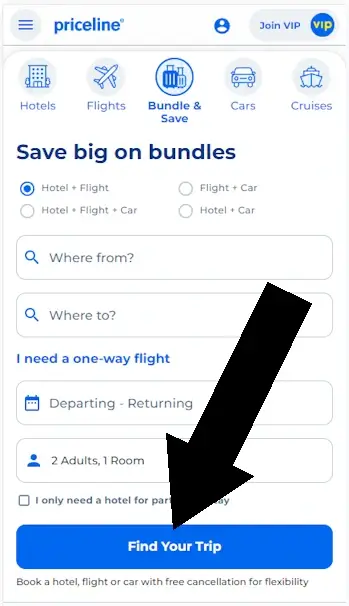
To redeem savings on a Priceline 'Bundled' vacation, first choose your destination and FIND YOUR TRIP.
Conclusion
So, where do you enter a Priceline promo code”? For EXPRESS DEALS on hotels, flights, and car rentals, you can apply it in the 'Summary of Charges' section on the listing page. When booking package vacations, discounts are applied automatically, so there's no option to use a promo code.
Key Takeaways
1. Coupons can only be applied on listings tagged as EXPRESS DEALS.
2. Coupons are redeemed differently according to what is being booked.
Tips:
- Always check the bottom of the Priceline homepage, that's where best deals are often linked from.
- Priceline is a corporate relative of booking.com, therefore be sure to check both sites and compare deals
- Taxes aren't included in the rates shown on the property's profile page or results. You'll notice that there are also various fees included when you book a room. When comparing rates online, it's important to check the total price, not the per room rate.
Other Retailers We Have Tested
- Lastminute coupon code guide
- CheapOair promo code guide
- Need help with another retailer? Browse our guides.