
Where Do I Enter My Hotels.com Coupon?
Time: 2–3 Minutes | Difficulty: Beginner | Tested by: Michael Tolley | Last tested:
Quick Answer
The Hotels.com coupon field only appears when you choose Pay Now during checkout. You’ll find it in the Summary section on the payment page.
What You'll Need
- A valid Hotels.com coupon code
- Payment method for immediate booking
- Flexibility to choose "Pay Now" properties only
Step-by-Step: How to Apply Your Coupon
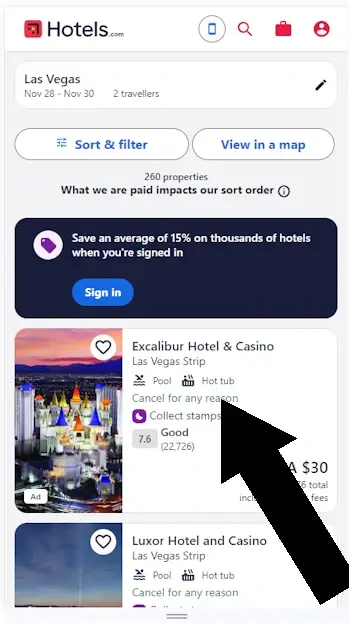
Step 1. Select Your Hotel
Navigate to your destination and choose a hotel. Select the property to view details and amenities.
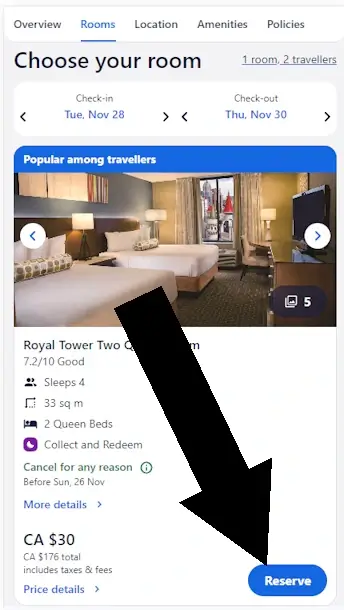
Step 2. Choose a Room
Review the options and once you are ready to proceed with the booking, click Reserve.
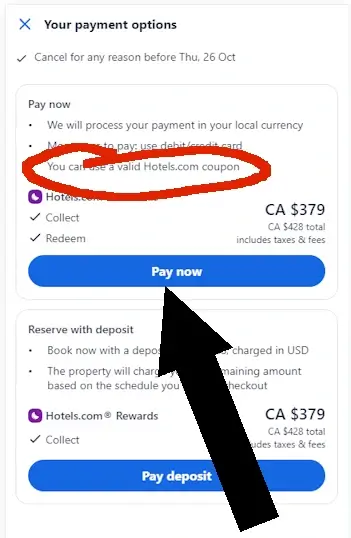
Step 3. Pay in Full
Some hotels require full payment at booking. When you see the Pay Now or Pay in Full option, review the terms — many Hotels.com coupons only work when you choose this payment method.
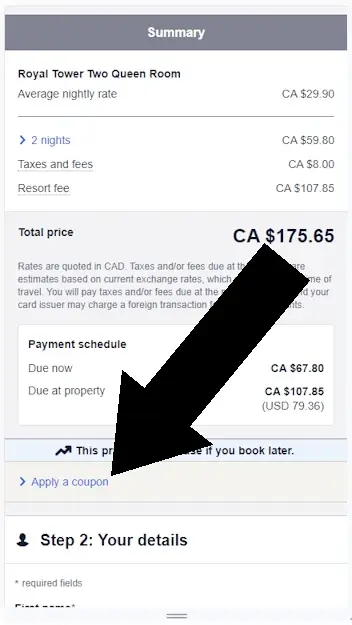
Step 4. Apply Coupon
In the Summary section, you find the link to enter your code. Click on the 'Apply a coupon code' link. A box will open for you to enter the code.
Using a Coupon on the App
On the Secure Checkout screen, look under Step 1 for Apply a coupon or Hotels.com Rewards. Tap this link to open the field where you can enter your code.
Before You Try to Apply a Code
Not all coupons work with every booking. Hotels.com controls which properties and dates qualify for each promotion. Here's what typically restricts coupon eligibility:
- Property participation Not all hotels accept promotional codes
- Room type or rate plan Some rates are specifically excluded
- Payment method Many codes only work with "Pay Now" bookings
- Minimum spend requirements Your total may need to reach a threshold
- Travel dates Blackout dates or peak periods may apply
- Geographic restrictions Some codes only work in certain regions
- Non-discountable charges Taxes, resort fees, and certain property charges aren't eligible
Important: If your code doesn't apply, it usually means the specific hotel or room you selected isn't eligible for that promotion, not that the code is invalid.
Troubleshooting Common Issues
“I don’t see the coupon field”
- Confirm you selected Pay Now
- Scroll to the Summary section
“My code was rejected”
- Check for typos or extra spaces
- Verify the code hasn’t expired
- Try an incognito/private browser
- Make sure your booking meets the minimum requirements
“The code is valid but won’t apply”
This usually means:
- The hotel doesn’t participate in the promotion
- The room type is excluded (common with non-refundable or discounted rates)
- Your travel dates fall during a blackout period
- You haven’t met the minimum spend requirement
What to try:
Search for a different property or adjust your dates. Eligibility varies widely by hotel.
More issues solved
Why Some Codes Don’t Work
Hotels.com doesn’t decide which properties participate in promotions. Even valid, non-expired codes may not apply because:
- Hotels opt in or out of promotions individually
- Promotional inventory can sell out
- Some codes target specific customer groups
- Terms may limit usage to certain property types or star ratings
Bottom line: A code that doesn’t apply isn’t necessarily broken, it may simply not match your selected hotel or dates.
Did this answer your question?

About Our Testing Process
WhereDoIEnterTheCoupon.com has been testing online retailer checkout flows since 2011. Every guide on this site is based on a checkout we navigated ourselves — on real orders, across desktop and mobile, retested whenever a retailer updates its UI. We document exactly where promo codes appear, what breaks them, and what to do when they fail. No guide is published from secondhand research.
Similiar Tutorials
- Travelocity coupon code guide
- Priceline promo code guide
- Need help with another retailer? Browse our guides.