
How Do I Use a Coupon on Agoda?
Complete guide with step-by-step instructions
Key Takeaway
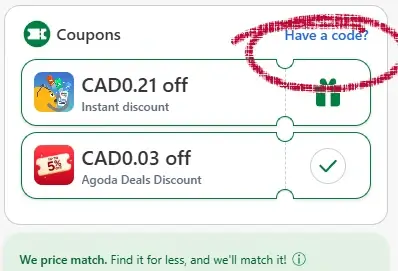
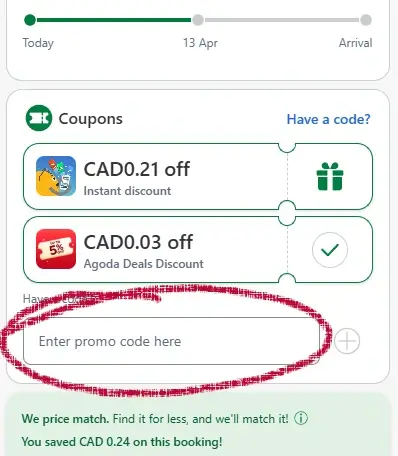
You can apply Agoda coupons on the Customer Information page, before tapping Final Step.
Time Required & Difficulty
Time Required
Difficulty
What You'll Need
- A hotel selected on Agoda
- A valid coupon, deal, or promotion
- Access to the Customer Information page
- A mobile device or desktop browser
How to apply a coupon on Agoda (Step-by-Step)
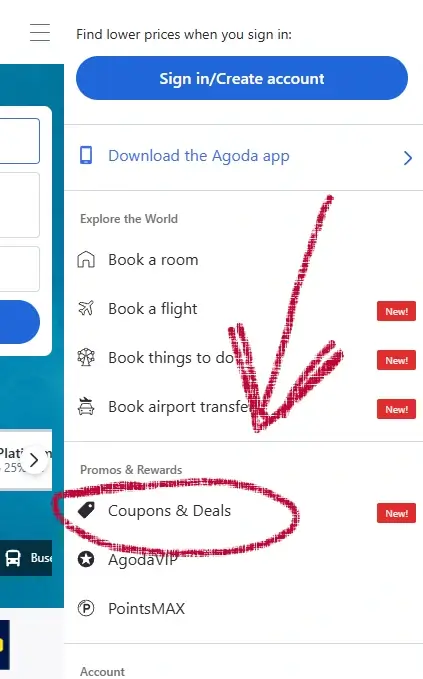
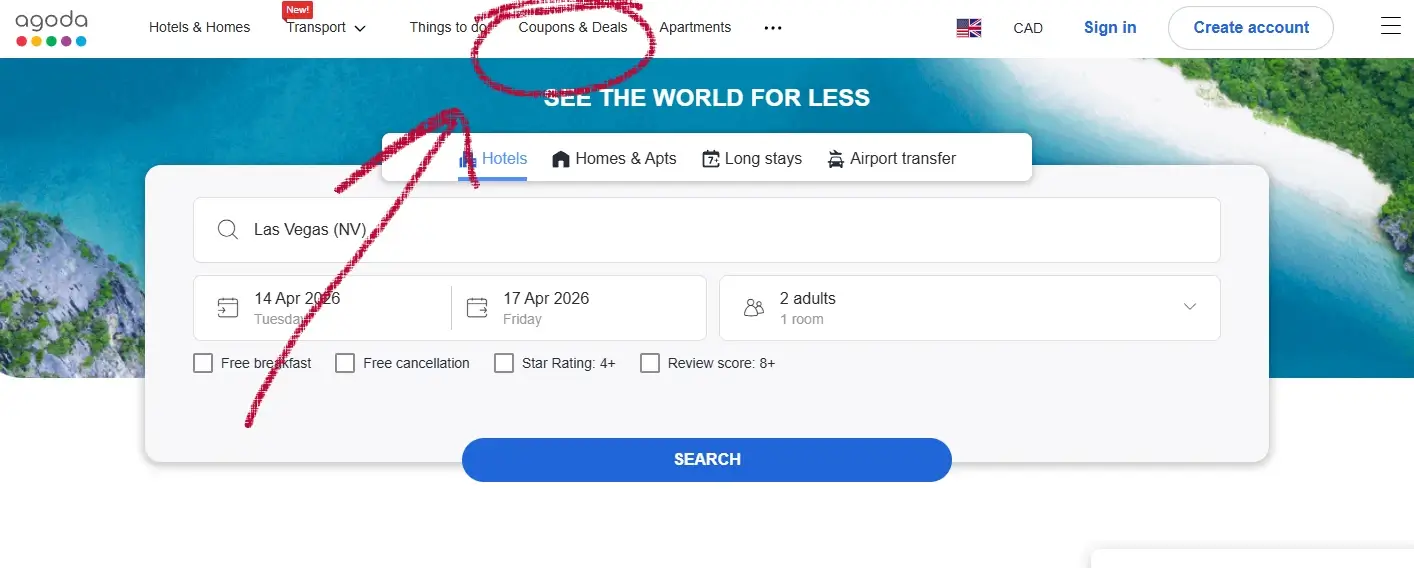
1. View Deals
Begin by locating discounts on AGODA. Click the three-line menu icon at the top corner and choose ‘COUPONS & DEALS’ to see current promotions.
Or access the deals directly through this link.
Mobile
Desktop
Looking for other travel coupon guides? See how to apply codes on Priceline, Travelocity, and CheapOair.
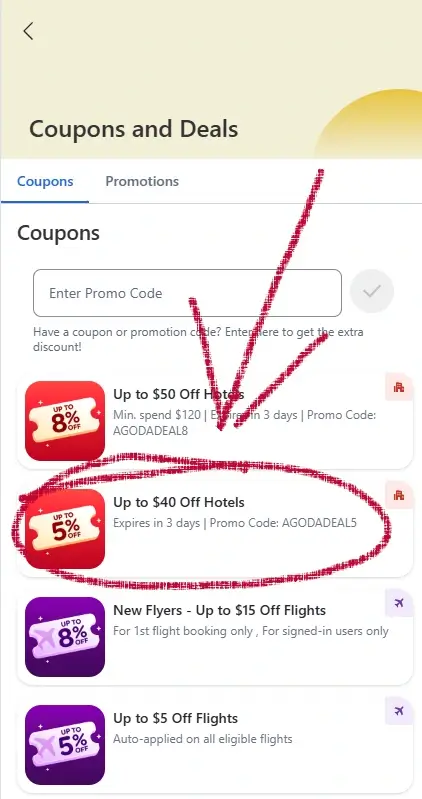
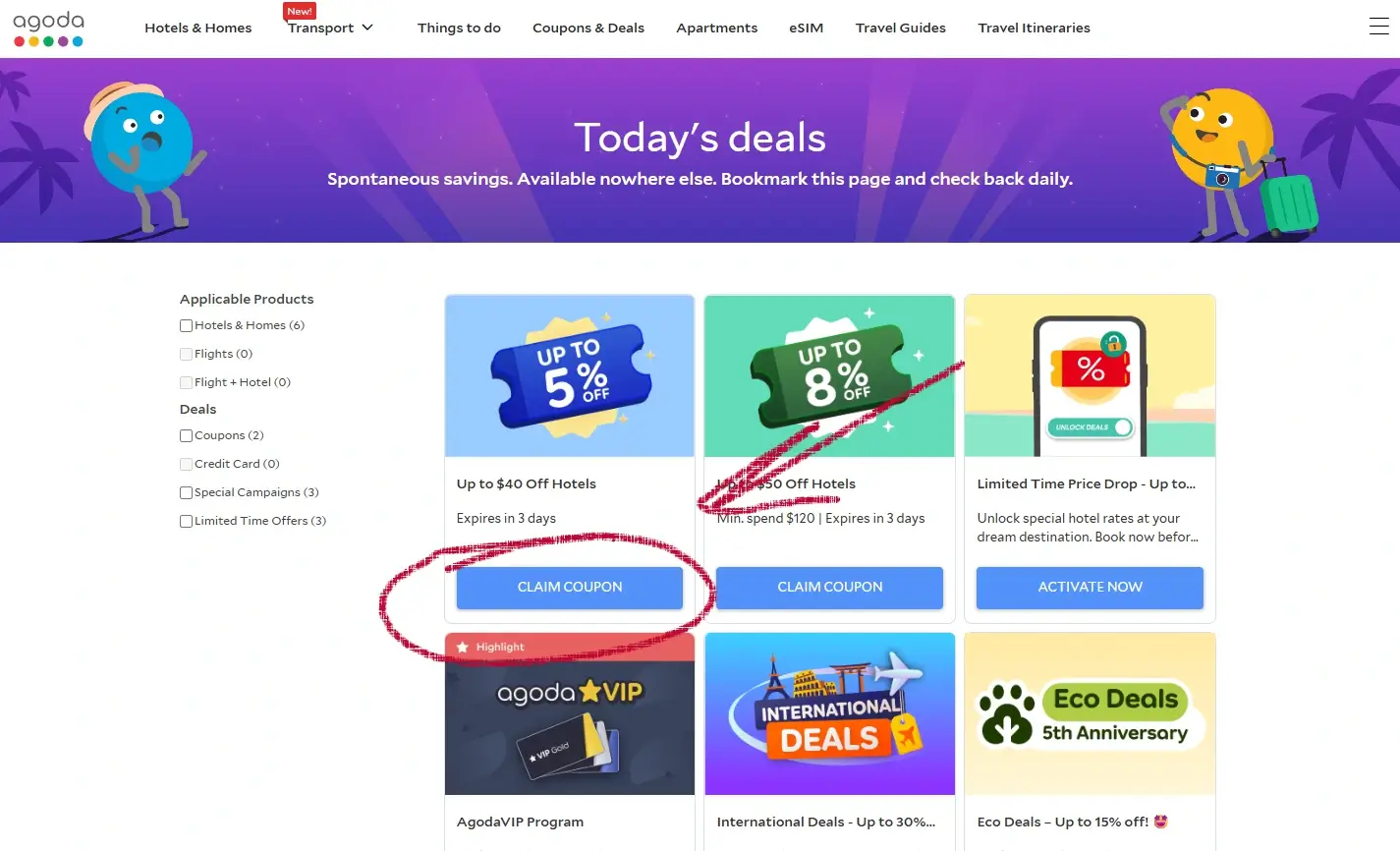
2. Select Offer
Next, browse the listed deals and click on your preferred one. A confirmation popup will indicate that your selected deal is now active.
Mobile
Desktop
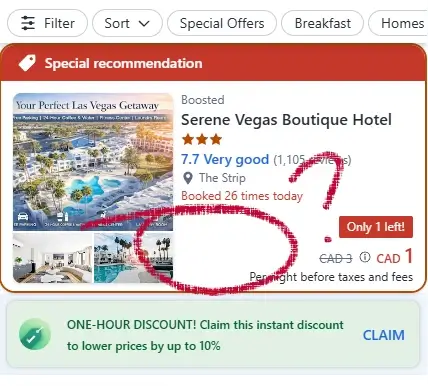
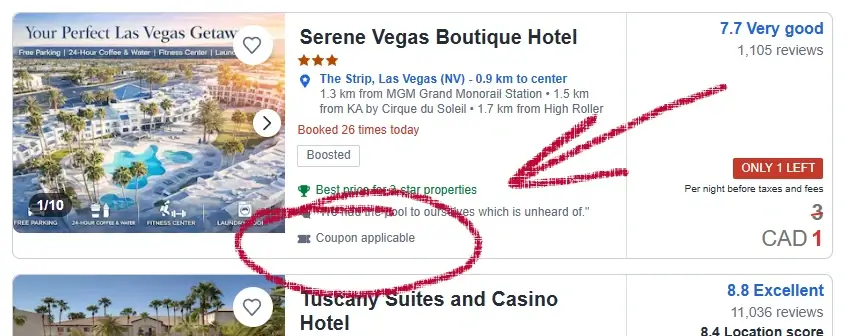
3. Search Coupon Applicable Properties
Choose a hotel clearly marked as 'Coupon Applicable'.
Note: This is more clearly visible on the Desktop version. It's recommended you use a desktop or large screen device to search for coupon applicable properties.
Mobile
Desktop
Disclosure: We may earn a commission if you complete a purchase on Agoda.com after using our guide. This never affects the steps, accuracy, or recommendations we publish. All information is based on independent testing and research conducted on .

Troubleshooting: Why Your Agoda Coupon May Not Work
The hotel doesn’t accept coupons
Not all Agoda listings support promo codes.
If the ENTER A PROMO CODE link is missing, the property has disabled discounts.
The offer is expired or limited to certain dates
Some deals only apply to:
- specific travel windows
- certain booking dates
- limited-time promotions
Always check the fine print in the offer details.
The coupon doesn’t apply to your room type
Common restrictions include:
- non-refundable rooms
- “pay at hotel” rates
- special member-only prices
- packages or bundles
Try switching to a different room or rate.
You’re using the Agoda app
Occasionally, the promo code field appears later in the app than on desktop.
If you don’t see it, switch to a browser.
You’re already using a deal
Some Agoda offers cannot be stacked with other promotions.
If a deal is already active, the promo code box may be hidden.
You’re not on the Customer Information page
The promo code field only appears after selecting a hotel and reaching:
CUSTOMER INFORMATION ENTER A PROMO CODE
If you’re still on the room-selection page, you won’t see it yet.
Agoda Coupon Report Card
Availability
Moderately Easy to Find - Promo codes are released occasionally, but not frequently. Most valid offers come directly from Adorama emails and official promotions.
Ease of Use
Easy to Use - The promo code field appears reliably during checkout under the Payment section. Once the link is tapped, the entry box opens immediately.
Checkout Timing
Early in Checkout - Adorama places the promo code field before payment details, making it easy to apply savings without completing the entire checkout flow.
Login Required
No Login Required - You can apply a promo code without creating an account, which keeps the process quick and user friendly.
FAQs
Do all Agoda hotels accept promo codes?
No. Some properties disable coupons. If the promo code box is missing, the hotel likely doesn’t support discounts.
Can I stack Agoda coupons?
You can use one promo code plus certain Agoda deals, but not all offers can be combined.
Why is my Agoda promo code not working?
It may be expired, restricted to certain dates, or incompatible with your room type.
Final Word
Agoda is one of the larger online travel agencies, offering millions of listings worldwide. It’s a solid option for finding competitive rates, but there are two things worth keeping in mind when you book:
- Compare with the hotel directly. Some travelers find that calling the hotel can unlock better rates or more flexible cancellation options. Direct contact also helps ensure special requests aren’t missed.
- Watch for extra fees. The price you see on Agoda doesn’t always include resort fees, service charges, or local taxes. These can appear later in the checkout process, so it’s worth reviewing the breakdown before you confirm.
If you’ve followed the steps above, you should now know exactly where to enter your Agoda coupon and how to make sure it applies correctly. If anything still feels unclear, feel free to reach out through our feedback form. Websites change often, and your feedback helps us keep these guides accurate.
Feedback
Did we clear up how to use a coupon on Agoda for you? If anything's still fuzzy, drop us a note through the contact form below. Websites evolve all the time, and your insights help us stay on the ball.
Did this answer your question?
Optional: tell us why or why not
About Our Testing Process
WhereDoIEnterTheCoupon.com has been testing online retailer checkout flows since 2011. Every guide on this site is based on a checkout we navigated ourselves — on real orders, across desktop and mobile, retested whenever a retailer updates its UI. We document exactly where promo codes appear, what breaks them, and what to do when they fail. No guide is published from secondhand research alone.
Similar Guides
- Booking.com coupon code guide
- cheapOair promo code guide
- Need help with another retailer? Browse our guides.