
Where Do I Enter The Coupon On Sams Club?
Time: 2–3 Minutes | Difficulty: Beginner | Tested by: Michael Tolley | Last tested:
Sam’s Club doesn’t release promo codes often, but when they do, the coupon field is easy to miss. Many shoppers expect to enter a code during final checkout, but Sam’s Club hides the offer field in the Shopping Cart, not at payment. This guide shows exactly where to find the Deals & Offers section and how to apply your code in a few quick steps.
Key Takeaway
Sam’s Club promo codes are entered in the Shopping Cart under the section labeled Deals & Offers. Add an item to your cart, tap Go to cart, and select Add an offer code to open the field where you can paste your coupon.
A Few Things to Know
- You must have an active Sam’s Club membership to shop online
- Promo codes are rare, most savings come from Instant Savings
- The coupon field appears only in the Shopping Cart
- The process takes about 1-2 minutes
What You Will Need:
- A Sam’s Club membership
- A valid promo code (if available)
- At least one item in your cart
How to Enter a Coupon on Sam’s Club
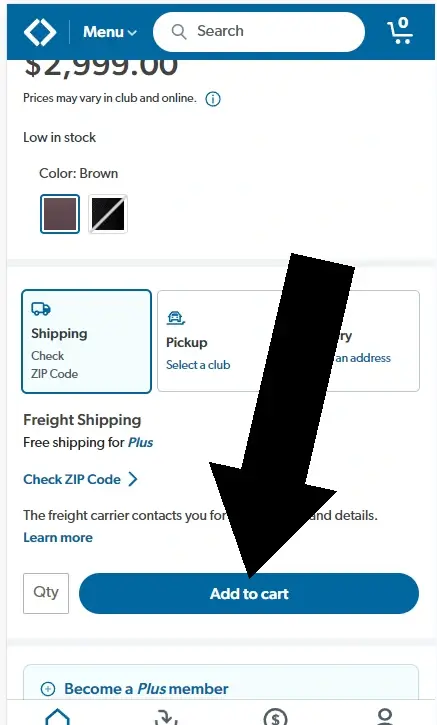
Step 1. Add an item to your cart
Browse Sam’s Club and tap Add to cart on the item you want.
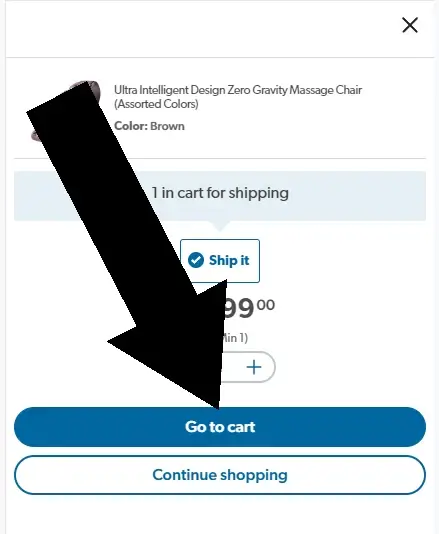
Step 2. Tap Go to cart
After adding your item, a popup will appear. Tap Go to cart to proceed.
Disclosure: We may earn a commission if you complete a purchase on SamsClub.com after using our guide. This never affects the steps, accuracy, or recommendations we publish. All information is based on independent testing and research conducted on .

Did this answer your question?
Sam's Club Coupon Report Card
| Category | Grade | Notes |
|---|---|---|
| Ease of Finding | C | Field is only in the cart; easy to miss |
| Ease of Use | B | Simple once located |
| Redeemed Early in Checkout | A | Appears before final checkout |
| Membership Required | D | Must have a paid membership |
Frequently Asked Questions
Does Sam’s Club accept coupon codes?
Yes, but they’re uncommon. Most savings come from Instant Savings and member pricing.
Where do I enter a Sam’s Club coupon?
In the Shopping Cart under Deals & Offers.
Do I need a membership to use a coupon?
Yes, online shopping requires an active membership.
Can I use multiple coupons?
No. Sam’s Club allows one promo code per order.
Why isn’t my coupon working?
It may be expired, used, excluded, or require a minimum purchase.
Conclusion
Sam’s Club coupons are entered in the Shopping Cart under Deals & Offers. Tap Add an offer code to paste and apply your promo. If the field isn’t visible, ensure you’re logged in and viewing the Shopping Cart page.
About Our Testing Process
WhereDoIEnterTheCoupon.com has been testing online retailer checkout flows since 2011. Every guide on this site is based on a checkout we navigated ourselves — on real orders, across desktop and mobile, retested whenever a retailer updates its UI. We document exactly where promo codes appear, what breaks them, and what to do when they fail. No guide is published from secondhand research.
Windows Firefox
iOS Safari
Android Chrome
Guest checkout
Logged-in account
Full-price items
Sale items
Pre-order items
Other Retailers We Have Tested
- Adorama coupon code guide
- Monoprice promo code guide
- Need help with another retailer? Browse our guides.