
How Do I Use a Coupon at Adorama?
Time: 2–3 Minutes | Difficulty: Beginner | Tested by: Michael Tolley | Last tested:
Key Takeaway
To use a coupon at Adorama, you’ll enter it under the Payment section during checkout on the final step. Look for the 'Payment' heading and tap the link labeled 'Do you have a gift card or promo code?' A field will open where you can paste your code. The steps below show the mobile checkout. The desktop checkout places the promo code field in the same location under the Payment heading.
Disclosure: We may earn a commission if you complete a purchase on Adorama.com after using our guide. This never affects the steps, accuracy, or recommendations we publish. All information is based on independent testing and research conducted on .
What You'll Need
- An item in your Adorama cart
- A valid Adorama promo code (optional)
- Payment method ready
Step-by-step: Where to enter a coupon code at Adorama
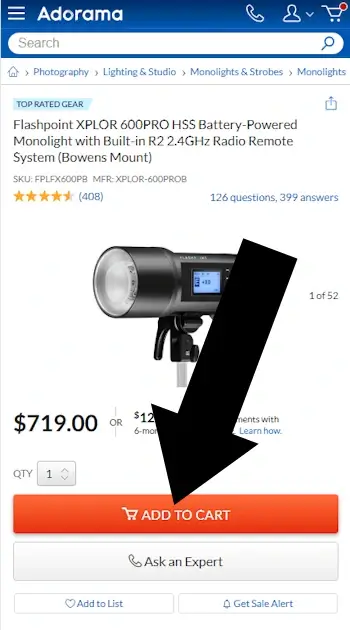
1. Add an item to your cart
Browse the site, and when ready add an item to your shopping cart.
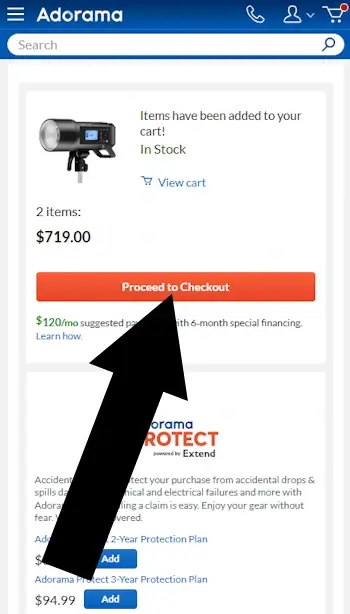
2. Tap Checkout
Confirm your purchase and then tap Proceed to Checkout.


Summary
- Add an item to your cart.
- Tap Checkout to begin the purchase process.
- Complete the Contact, Shipping, and Delivery sections.
- Under the Payment heading, tap Do you have a gift card or promo code? to open the field and enter your code.
Adorama Coupon Report Card
| Category | Grade | Notes |
|---|---|---|
| Findability | B | Most valid offers come directly from Adorama emails and official promotions. |
| Ease of Use | B | Simple link reveals the entry field |
| Checkout Timing | B | Field appears early during checkout |
| Login Required | A | No account required to enter a code |
Frequently Asked Questions
Does Adorama accept coupon codes?Yes, but codes are released occasionally. Most savings come from regular sales and seasonal promotions.
Where do I enter an Adorama coupon?
Under the Payment section during checkout, tap "Do you have a gift card or promo code?" to open the entry field.
Do I need an account to use an Adorama coupon?
No, you can apply promo codes as a guest during checkout.
Can I use multiple coupons on one order?
Typically no. Adorama usually limits customers to one promo code per order.
Why isn't my Adorama coupon working?
The code may be expired, excluded from certain brands/items, or require a minimum purchase amount. More common issues explained in our comprehensive guide. If you want to rule out a formatting issue, try our Coupon Code Tester.
Conclusion
If Adorama is running a valid promotion, the promo code field will appear under the Payment section during checkout. If the link doesn’t appear, no coupon can be applied.
Did this answer your question?
Optional: tell us why or why not
About Our Testing Process
WhereDoIEnterTheCoupon.com has been testing online retailer checkout flows since 2011. Every guide is based on a checkout completed on real devices using real orders.
For this Adorama guide, we added items to the bag, confirmed that the Shopping Bag loaded correctly, located the promo code field, and applied a test code to verify that the discount updated the total. The Adorama website was last tested .
Test conditions used for this guide:
Windows Firefox
iOS Safari
Android Chrome
Guest checkout
Logged-in account
Full-price items
Sale items
Pre-order items
Similar Tutorials
Looking for coupon instructions on other retailers? These guides show exactly where to enter promo codes.
- Lenovo coupon code guide
- HP promo code guide
- Need help with another retailer? Browse our guides.