
Where Do I Enter The Coupon on Monoprice?
Time: 2–3 Minutes | Difficulty: Beginner | Tested by: Michael Tolley | Last tested:
Monoprice is known for affordable, high quality electronics, cables, and home theater gear. If you’re shopping on their site and wondering where to enter a Monoprice coupon, the answer is simple: the Promo Code box appears inside the Shopping Cart.
Below is the clean, step-by-step guide.
Disclosure: Some links on this page are affiliate links. If you make a purchase after clicking them, we may earn a small commission at no extra cost to you. This never affects our steps, accuracy, or recommendations.
Quick Answer
You’ll enter your Monoprice coupon in the PROMO CODE box inside the Shopping Cart, before payment.
How to Apply a Coupon on Monoprice
Step 1 — Add an Item to Your Cart
Choose the product you want and click Add to Cart.
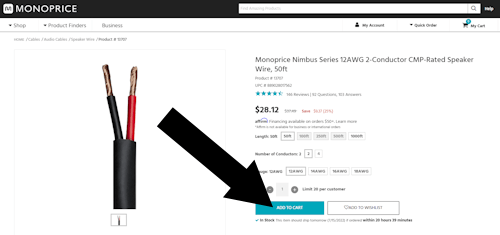
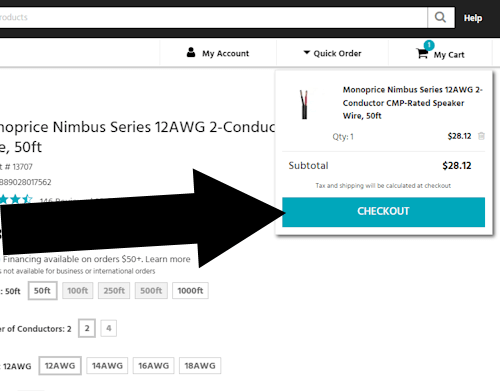
Step 2 — Go to Checkout
A small popup may appear. If not, click the cart icon in the top-right corner to open your Shopping Cart.
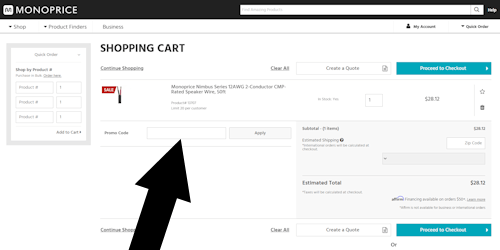
Step 3 — Enter Your Promo Code
Inside the Shopping Cart, look for the field labeled Promo Code.
Enter your code and select Apply.
Troubleshooting Monoprice Promo Codes
- Code not applying — Many Monoprice codes apply only to specific categories or minimum order amounts.
- Expired code — Monoprice promotions often run for short windows; double-check the expiration date.
- Already discounted items — Some products (especially cables and house-brand accessories) may be excluded from additional coupons.
- One code at a time — Monoprice typically allows only one promo code per order.
Monoprice Coupon FAQ
Does the Monoprice promo code field appear before or after I log in?
The Promo Code box appears before you log in. It is located inside the Shopping Cart, and you can apply a coupon whether you are signed in or checking out as a guest.
Can I use a coupon on Monoprice Select or Premium items?
Usually no. Monoprice Select, Premium, and already discounted items are often excluded from promo codes. If a code is not applying, the item category is one of the most common reasons.
Where can I find working Monoprice promo codes?
Monoprice posts active offers on their strong>Deals page, in their email newsletter, and during major sale events.
Third party coupon sites may list additional codes, but many are expired or product specific, so always check the fine print.
Bottom Line
To use a Monoprice coupon:
- Add an item to your cart
- Open the Shopping Cart
- Enter your code in the Promo Code box
Your discount appears immediately once the code is accepted.
Did this answer your question?

About Our Testing Process
WhereDoIEnterTheCoupon.com has been testing online retailer checkout flows since 2011. Every guide on this site is based on a checkout we navigated ourselves — on real orders, across desktop and mobile, retested whenever a retailer updates its UI. We document exactly where promo codes appear, what breaks them, and what to do when they fail. No guide is published from secondhand research.
Test conditions used for this guide:
Windows Firefox
iOS Safari
Android Chrome
Guest checkout
Logged-in account
Full-price items
Sale items
Similar Tutorials
Looking for coupon instructions on other retailers? These guides show exactly where to enter promo codes.