
Where Do I Enter The Coupon On Sams Club?
Time: 2-3 Minutes
Difficulty: Beginner
Sam’s Club doesn’t release promo codes often, but when they do, the coupon field is easy to miss. Many shoppers expect to enter a code during final checkout, but Sam’s Club hides the offer field in the Shopping Cart, not at payment. This guide shows exactly where to find the Deals & Offers section and how to apply your code in a few quick steps.
Key Takeaway
Sam’s Club promo codes are entered in the Shopping Cart under the section labeled Deals & Offers. Add an item to your cart, tap Go to cart, and select Add an offer code to open the field where you can paste your coupon.
Before You Begin
A Few Things to Know
- You must have an active Sam’s Club membership to shop online
- Promo codes are rare, most savings come from Instant Savings
- The coupon field appears only in the Shopping Cart
- The process takes about 1-2 minutes
What You'll Need
- A Sam’s Club membership
- A valid promo code (if available)
- At least one item in your cart
How to Enter a Coupon on Sam’s Club
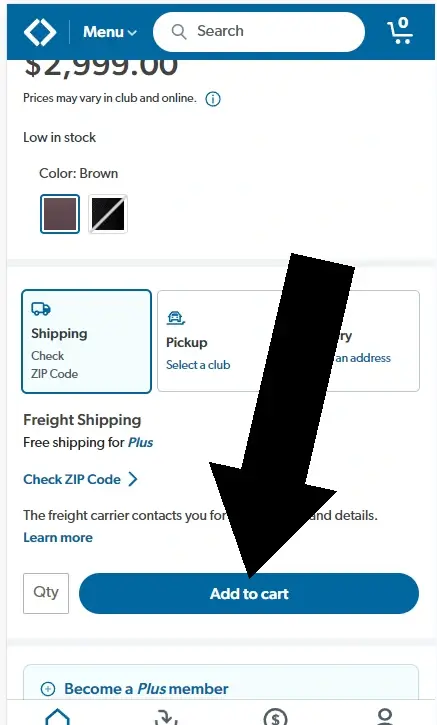
Step 1. Add an item to your cart
Browse Sam’s Club and tap Add to cart on the item you want.
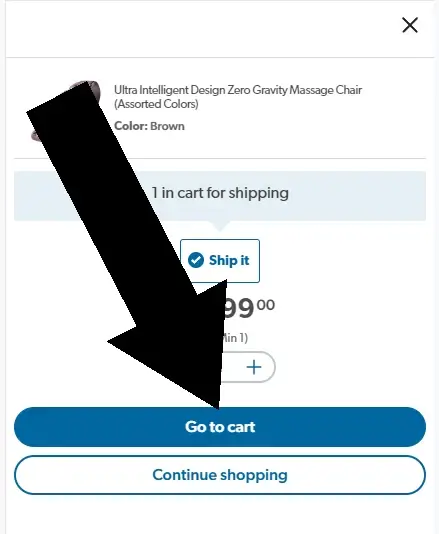
Step 2. Tap Go to cart
After adding your item, a popup will appear. Tap Go to cart to proceed.

Sam’s Club Coupon Report Card
| Category | Grade | Notes |
|---|---|---|
| Ease of Finding | C | Field is only in the cart; easy to miss |
| Ease of Use | B | Simple once located |
| Redeemed Early in Checkout | A | Appears before final checkout |
| Membership Required | D | Must have a paid membership |
Frequently Asked Questions
Does Sam’s Club accept coupon codes?
Yes, but they’re uncommon. Most savings come from Instant Savings and member pricing.
Where do I enter a Sam’s Club coupon?
In the Shopping Cart under Deals & Offers.
Do I need a membership to use a coupon?
Yes, online shopping requires an active membership.
Can I use multiple coupons?
No. Sam’s Club allows one promo code per order.
Why isn’t my coupon working?
It may be expired, used, excluded, or require a minimum purchase.
About Sam's Club
Sam’s Club, owned by Walmart, operates over 600 U.S. locations and offers bulk groceries, electronics, furniture, and household essentials. Members can save through Instant Savings, seasonal promotions, and Sam’s Cash rewards.
Conclusion
Sam’s Club coupons are entered in the Shopping Cart under Deals & Offers. Tap Add an offer code to paste and apply your promo. If the field isn’t visible, ensure you’re logged in and viewing the Shopping Cart page.
About the Author
James Lowe writes straightforward, step-by-step guides for retail checkout processes, membership clubs, and e-commerce platforms. His work focuses on accuracy, accessibility, and user-first explanations that help readers complete tasks quickly and confidently. He emphasizes practical detail, clean structure, and trustworthy information users can rely on.
Disclosure: We are not employed by Sam’s Club or Walmart. All information is based on independent testing and research of the Sam’s Club checkout process. Testing done on .
Similar Tutorials

How Do I Use a Coupon at Adorama?
How Do I Use a Coupon at Adorama?By J Lowe | Last updated Time: 2-3 MinutesDifficulty: BeginnerTo use a coupon at Adorama, you’ll enter it under the Payment section during checkout on the final step. Look for the 'Payment' heading and...

Where Do I Enter The Coupon on Monoprice?
How to use a Monoprice couponEstablished in 2002 Monoprice is a company that specializes in offering electronics. It was co founded by Seok Hong and Jong Lee. On their website you'll discover a range of products not only manufactured by Monoprice but also by other...

Where Do I Enter The Coupon on Lenovo?
Where Do I Enter the Coupon on Lenovo? Lenovo promo codes are entered in the Shopping Cart under the heading Have an eCoupon or Discount? Add an item to your cart, tap Skip to Cart, and enter your code before checkout.Time Required 1-2...