
Where Do I Enter a Walmart Coupon?
Quick Answer
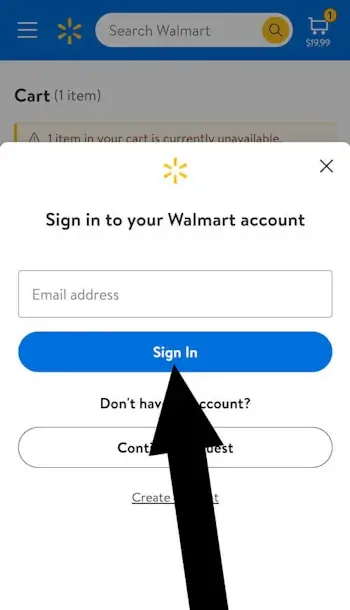
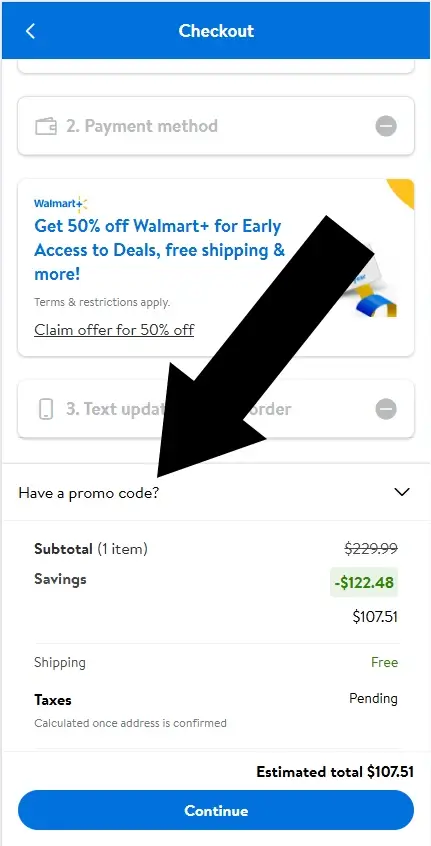
Walmart promo codes only work when you’re logged in. The coupon field won’t appear otherwise. If logged in, Walmart coupon codes are entered on the Review Order page.
What You’ll Need
Time: 3-4 minutes
Difficulty: Easy
- Items in your Walmart cart
- Valid Walmart promo code
- Walmart account login (guest checkout won’t work)
- Payment method for final checkout
Difficulty: Easy/Moderate Time: 2-3 minutes
How to use a Walmart coupon
Step 1: Add items to your cart
Add your items to the cart. When you’re ready to check out, tap the shopping cart icon in the top right corner.

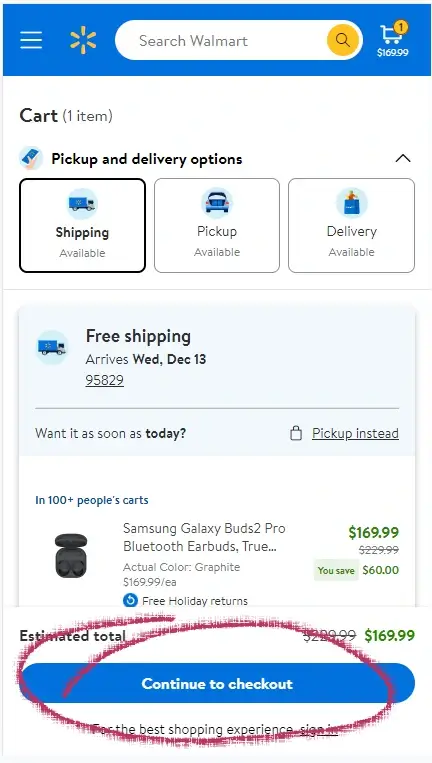
Step 2: Continue to checkout
Review the items in your cart. If everything looks correct, tap Continue to checkout.
FAQs
1. Does Walmart require an account to use promo codes?
Yes. Walmart only shows the promo code field to logged-in users. Guest checkout hides the “Have a promo code?” link entirely. Creating an account is free and takes about two minutes.
2. Why can’t I see the promo code box on Walmart?
You’re likely checking out as a guest. The promo code field appears only after signing in. Once logged in, the “Have a promo code?” link shows on the Review Order page under the order total.
3. Where do I enter a Walmart coupon on desktop?
On desktop, the promo code link appears in the right-side Order Summary panel on the Review Order page. Click “Have a promo code?” to open the entry box.
4. Why is my Walmart promo code not working?
Common reasons include: expired code, item restrictions, minimum spend not met, account-specific offers, or single-use codes already redeemed. Check the terms of the promotion and confirm your cart qualifies. Note: Some codes only work on full-price items, not clearance or rollback prices.
5. Can I use multiple Walmart promo codes?
No. Walmart allows only one promo code per order. However, promo codes can stack with automatic discounts, rollbacks, and Walmart+ member pricing.
6. Do Walmart promo codes work in-store?
No. Online promo codes cannot be used in physical Walmart stores. In-store shoppers must use paper coupons or digital coupons loaded through the Walmart app.
7. Does Walmart accept manufacturer coupons online?
No. Walmart.com does not accept manufacturer coupons during online checkout. Only Walmart-issued promo codes work online. Manufacturer coupons are accepted in-store.
8. Do Walmart promo codes work for grocery pickup or delivery?
Usually not. Most Walmart promo codes exclude grocery orders. Occasionally Walmart releases codes specifically for pickup or delivery, these will be clearly labeled in the offer details.
Walmart Coupon Report Card
Easy to find
Applied during checkout
Login Required
Report Card Summary
Walmart’s coupon system is easy to navigate once you’re logged in, but the required login adds an extra step many shoppers don’t expect. Here’s how the experience breaks down:
- Clearly labeled promo code field
- Easy to find on the Review Order page
- Login required before applying a code
- Less convenient for fast-checkout shoppers
Walmart’s login requirement is unique among major retailers. While this adds a step, it allows Walmart to:
- Track coupon usage per account (prevents abuse).
- Link discounts to your purchase history.
- Apply member-specific offers automatically.
Bottom line: If you shop at Walmart regularly, creating an account takes 2 minutes enables coupon use, order tracking, and faster future checkouts.
How Walmart Compares
Here’s how Walmart’s coupon process stacks up against other major retailers.
| Retailer | Login Required | Coupon Entry Point | Guest Checkout |
|---|---|---|---|
| Walmart | Yes | Review Order page | No codes |
| Target | No | Cart page | Allows codes |
| Amazon | No | Final checkout | Allows codes |
| Best Buy | No | Cart page | Allows codes |
Conclusion
Walmart does allow coupon codes, but only when you’re signed in and viewing the Review Order page. As long as you log in before checkout, the promo code field is easy to find and simple to use. Follow the steps above, avoid guest checkout, and you’ll be able to apply your Walmart discount without any trouble.
About the Author
James Lowe creates clear, step-by-step guides that help shoppers navigate major online retailers with confidence. His work focuses on accuracy, accessibility, and user-first explanations, with an emphasis on practical detail, clean structure, and trustworthy information readers can rely on.
Disclosure: We are not affiliated with Walmart.com. All information is based on independent testing and research done on .
Related Guides

Where Do I Enter The Coupon On Sams Club?
Time: 2-3 MinutesDifficulty: BeginnerSam’s Club doesn’t release promo codes often, but when they do, the coupon field is easy to miss. Many shoppers expect to enter a code during final checkout, but Sam’s Club hides the offer field in the Shopping Cart, not at...

Where Do I Enter a B&H Photo Coupon? Complete Eligibility Guide
Time: 2-3 MinutesDifficulty: IntermediateNeed to know where to enter the coupon on B&H Photo Video? The promo code box appears at checkout only if your item qualifies for discounts. This guide shows exactly where the coupon box appears, how to check eligibility,...

Where Do I Enter the Coupon on Aliexpress?
This article answers the question “Where do I enter the coupon on Aliexpress?”.There are two types of coupons available for redemption on Aliexpress (Seller Coupons & AliEpress Coupons), we will show you how and where to enter the coupon in each case.Where Do I...