
How to Use a Coupon at Booking.com
By J. Lowe | Last updated
Using a coupon code at Booking.com can save you money on your stay, but finding where to enter it is not always obvious. This guide shows you exactly where to apply your promo code during checkout, in 4 simple steps that take less than 2 minutes, so you can see the coupon field before you enter any payment details.
What You'll Need Before You Start
- A valid coupon or promo code (check the expiration date)
- An active booking in progress on Booking.com
- The code’s terms and conditions (some codes only work for specific hotels or dates)
- Your booking dates and hotel selected
- Payment method ready
Difficulty Easy/Moderate Time Required 3 Minutes
How to Apply a Booking.com Coupon
Step 1. Choose a hotel
Choose your preferred hotel and dates. You can search by location, filter by price range, and read reviews to find the perfect accommodation.
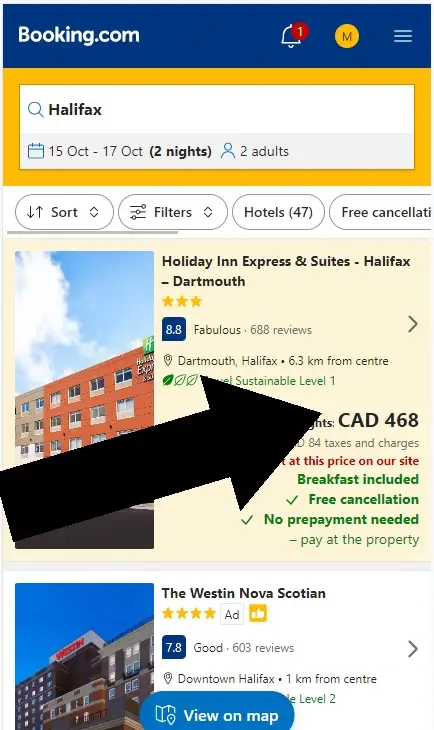
Booking.com hotel search results page showing various properties with filters for location, price, and amenities
Step 2. Pick a room
Review room options and choose based on size, bed type, view, floor level, and included features.
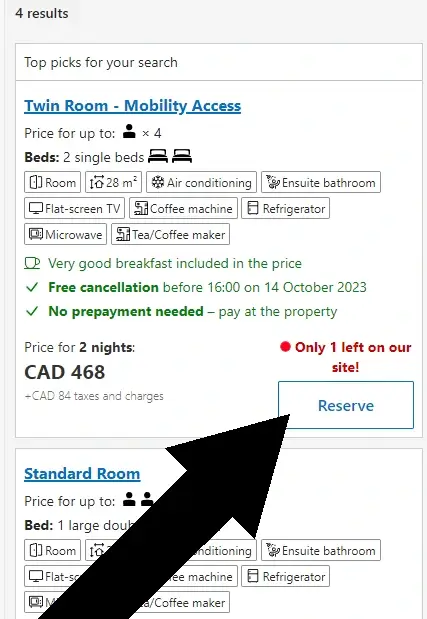
Room selection page showing different room options with pricing
Quick Reference Summary
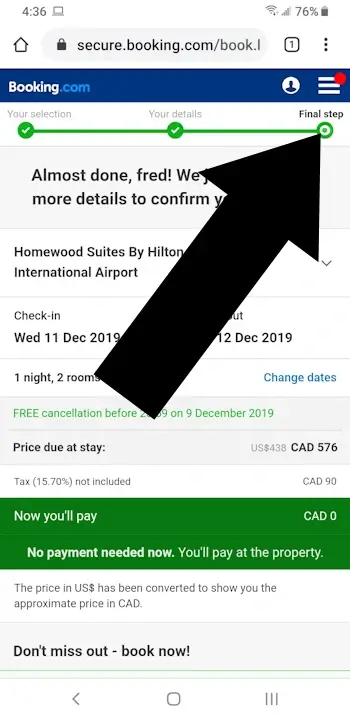
- Find the coupon field on the Final Step checkout page
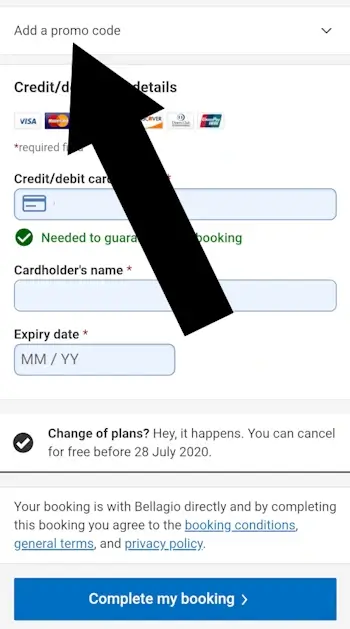
- It appears BEFORE you enter credit card details
- No login required to enter your code
- Most codes are hotel-specific or date-restricted
- Scroll down past guest details to find the link
- Discount applies immediately when you enter a valid code
Feedback
Did our step-by step guide answer the question ‘where do I enter my booking.com coupon?‘
Your feedback helps improve future tutorials.
Key Takeaway
The Booking.com coupon field only appears on the Final Step checkout page, directly above the payment section. If you don’t see it, your code may not be eligible for your room type, dates, or property.
Booking.com Coupon Review
How Accessible Are Booking.com Promo Codes?
Booking.com does support promo codes, but they are not widely distributed. Most legitimate codes come directly from Booking.com via email, loyalty offers, or targeted promotions tied to specific hotels or dates.
Many third-party coupon sites list codes that do not work. This is common across travel platforms.
Booking.com Coupon Health Card
A quick summary of how easy it is to use a coupon on Booking.com.
Not easy to find
D
The promo code field appears late in checkout and is easy to miss.
Before credit card
A
You can enter your promo code before providing payment details.
No login needed
A
You can reach the promo code field without logging into an account.
Troubleshooting: Why Your Code May Not Work
- Code is hotel-specific
Many Booking.com codes only apply to a single property or chain. - Code is targeted
Some offers are sent to individual users and cannot be shared. - Minimum stay or date restrictions
Promo codes may require certain travel dates or a minimum number of nights. - Room type exclusions
Not all room categories qualify for discounts. - Expired or single-use codes
Many Booking.com codes have short validity windows.
Booking.com Coupon FAQ
Booking.com does accept promo and coupon codes, but the field is easy to miss and most codes come with strict terms. These answers explain where to enter them, when they work, and common issues users run into. More answers can be found on the official FAQ.
Can I use a coupon code on Booking.com?
Yes. Booking.com accepts promo codes during checkout on the Final Step page, directly above the credit card section. The discount applies immediately, but each code has specific terms such as eligible hotels, dates, and room types.
Where exactly do I find the coupon code entry box on Booking.com?
The coupon field appears on the Final Step checkout page. Scroll past your guest details until you see a link labeled “Have a coupon code?” or “Enter promo code.” Click it to open the entry box above the payment fields.
Why isn’t my Booking.com coupon code working?
Most codes fail because they:
- Are expired or already used
- Apply only to specific hotels, dates, or room types
- Require a minimum stay
- Are case-sensitive and mistyped
- Always compare your booking details with the code’s terms and conditions.
Can I get 20% off on Booking.com?
Yes, but 20% discounts are uncommon. They typically appear through Genius loyalty rates or limited-time promotions. Most standard promo codes fall in the 5-15% range.
Do Booking.com coupons work on all hotels?
No. Most codes are restricted to certain properties, destinations, room types, or travel dates. Check the code’s terms before starting your booking.
Can I combine multiple coupon codes on one booking?
No. Booking.com only allows one promo code per reservation. In some cases, a single promo code may combine with a Genius discount if the property supports both.
What’s the difference between a coupon code and a promo code on Booking.com?
There is no difference. Booking.com uses “coupon code,” “promo code,” “discount code,” and “voucher code” interchangeably.
How do I know if my coupon was applied successfully?
After clicking Apply, the page should refresh with:
- A lower total
- A confirmation message such as “Promo code applied”
- A line item showing the discount in the price breakdown
Always confirm the updated total before entering payment details.
Do I need a Booking.com account to use a coupon code?
No. You can apply a promo code as a guest. However, creating an account unlocks Genius discounts, which may stack with eligible promo codes.
Can I use a coupon code after I’ve already made a booking?
No. Promo codes cannot be applied to existing reservations. If your booking allows free cancellation, you may cancel and rebook with the code applied during checkout.
Booking.com vs Direct Hotel Booking: What to Know
Booking.com and other travel platforms often use rate-parity agreements, which means hotels are required to list similar base prices across major booking sites. Because of this, the price you see on Booking.com is usually close to what the hotel offers directly.
Hotels may still provide unadvertised perks when booking with them, such as flexible cancellation or small upgrades. Booking.com, on the other hand, offers convenience, wide availability, and occasional promotions or Genius discounts.
If you’re comparing prices, it can be worth checking both options. For coupon use specifically, discounts must be applied during Booking.com checkout and cannot be used when booking directly with a hotel.
The Author
James Lowe is a content specialist who creates clear, step-by-step guides for travel, retail, and online booking platforms. He focuses on accuracy, accessibility, and user-first explanations that help readers complete tasks quickly and confidently. His work emphasizes practical detail, clean structure, and trustworthy information users can rely on.
Disclosure: All information is based on independent testing and research. The site was last tested on .
Related Guides

How do I redeem my JetBlue Coupon?
How do I redeem my JetBlue Coupon?Jetblue.com offers a variety of promo codes, however, redeeming them is a challenge if you don’t know where to look. The trick is that you cannot enter the promo code on the main jetblue.com site. They have built a different landing...

Where Do I Enter a Coupon on Expedia?
Before you begin, make sure you have: A valid Expedia coupon or promo code Your travel dates and destination An Expedia account (free) A payment method ready Estimated time: 5–10 minutesQuick Navigation Jump to your booking type: A) Hotels B) Vacation Packages C) Car...

Where Do You Enter a Priceline Promo Code?
Where Do You Enter a Priceline Promo Code?Coupons on Priceline can only be applied to deals marked "Express Deals". The search for Express Deals can be done by narrowing down the search using filters as described below.Important How to use a Priceline Coupon: 1....