
Where Do I Enter The Coupon On Dicks Sporting Goods?
Time: 2–3 Minutes | Difficulty: Beginner | Tested by: Michael Tolley | Last tested:
What You'll Need
- A Dick's Sporting Goods account (or guest checkout)
- Items added to your cart
- A valid promo code
- A payment method ready
Key Takeaway
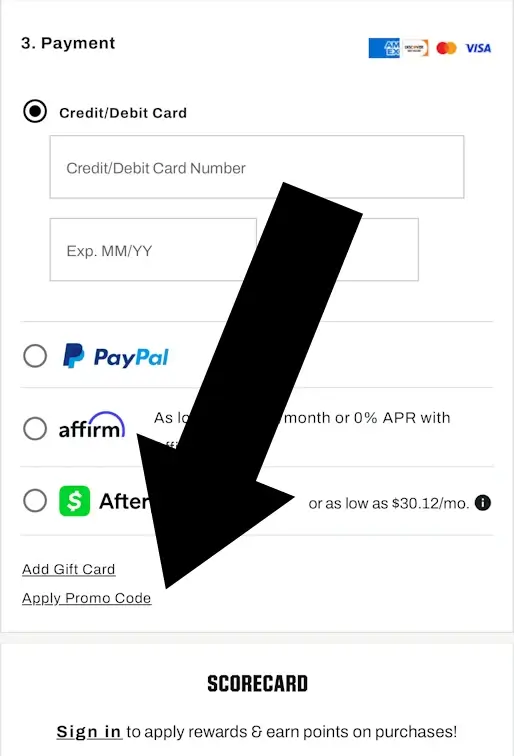
The promo code field at Dick's is in the Payment section at checkout - not at the cart stage. Scroll to the bottom left of the payment page, enter your code, and click Apply Promo Code. The discount shows immediately.
How to Apply a Promo Code at Dick's Sporting Goods
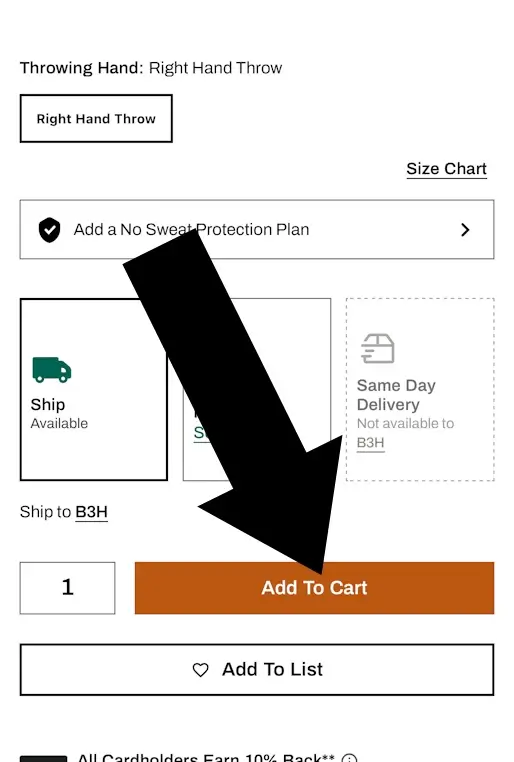
1Add Items to Your Cart
Browse dickssportinggoods.com and click Add to Cart on any item you want. A side panel or pop-up will open confirming the item was added. You can keep shopping or proceed to your cart.
Tip: Many Dick's promo codes require a minimum spend — usually $100 for email and text welcome codes. Check your code's terms before you start shopping so you know what you're working toward.
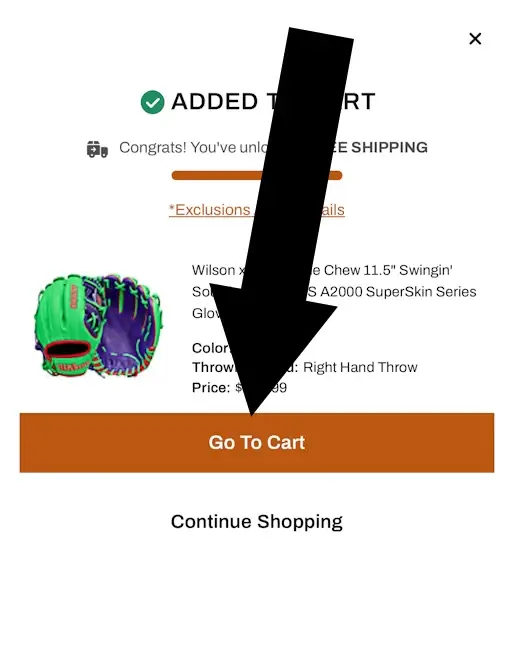
2Open Your Cart
Click the cart icon in the top right corner. A side panel opens showing your items and your subtotal. Click Go to Cart to review everything.
Tip: If you're a ScoreCard member, log in before checkout. Members get free shipping at $49; non-members need to spend $65.
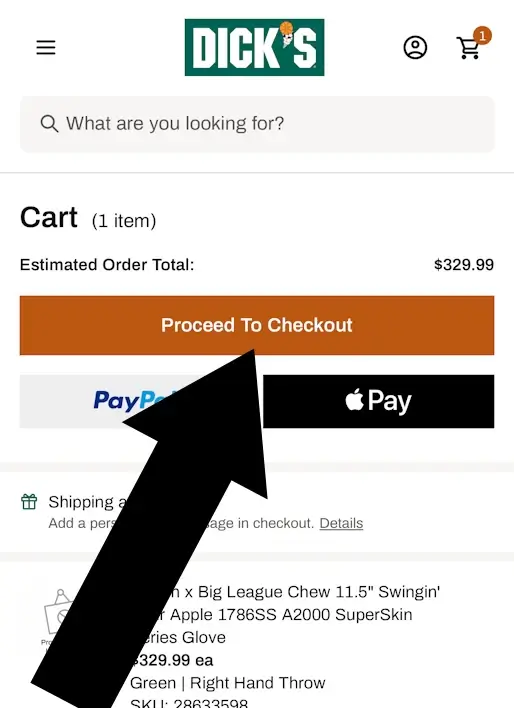
3Go to Checkout
Tap Proceed To Checkout.
Disclosure: We may earn a commission if you complete a purchase on Dicks Sporting Goods website after using our guide. This never affects the steps, accuracy, or recommendations we publish. All information is based on independent testing and research conducted on .
Troubleshooting
Do
Do check the expiry date before you try to apply a code
Do make sure your cart total meets the minimum spend before applying
Do review your cart for excluded brands or categories — Nike, Under Armour, and Adidas are commonly excluded, and firearms and ammunition are always excluded
Do check whether the code is for new customers only before checkout
Do use codes from verified coupon sources when combining with a cashback portal
Don't
Don't assume a code is still valid just because a coupon site is showing it
Don't apply the code first and expect it to tell you how much more to spend
Don't assume a sitewide code works on every item in your cart
Don't try a first-time buyer code on an account you've previously purchased with
Don't apply a random code from an unverified site — it can void your cashback as well as the discount
Ways to Get a Dick's Promo Code
You don't always need to hunt for a code. Dick's has several built-in ways to earn one:
Email signup. New subscribers get $20 off a purchase of $100 or more. Sign up via the footer on dickssportinggoods.com and check your inbox.
Text signup. New text subscribers get the same $20 off $100+ offer. One code per phone number.
The Dick's app. The app carries exclusive offers — including $20 off $100+ — that aren't available on the website. Worth downloading if you shop Dick's regularly.
Birthday reward. Add your birthday to your ScoreCard account and you'll receive a birthday discount code in your inbox.
ScoreCard loyalty program. Dick's free rewards program earns you 1 point per dollar spent. Every 300 points converts to a $10 reward. Spend $500 in a calendar year to reach Gold status and unlock better perks.
Community discounts. Active military, veterans, and their families get 10% off in-store and online. Healthcare workers can get 10% off select items through ID.me verification via the Community MVP's program — usable on one eligible product twice every 30 days.
Dick's Sporting Goods Coupon FAQ
Do I need a Dick's account to use a promo code?
No. Guest checkout accepts promo codes at the same payment step. You just won't earn ScoreCard points on the purchase.
Can I use more than one code?
No. Dick's allows one promo code per order. Stack it with a sale item for maximum savings.
Can I combine a promo code with ScoreCard rewards?
Sometimes. Some codes are combinable with ScoreCard rewards; others aren't. Check the terms of your specific code before applying.
Your Title Goes Here
Your content goes here. Edit or remove this text inline or in the module Content settings. You can also style every aspect of this content in the module Design settings and even apply custom CSS to this text in the module Advanced settings.
Can I use a promo code in-store?
No. Online promo codes are only valid at dickssportinggoods.com.
Does the 10% military discount stack with a promo code?
It can — the Community MVP discount is separate from standard promo codes. Confirm eligibility at checkout.
What is the Dick's return policy?
Most items can be returned within 90 days, clean and resalable, with proof of purchase.
Did this answer your question?
Similar Tutorials



About Our Testing Process
WhereDoIEnterTheCoupon.com has been testing online retailer checkout flows since 2011. Every guide on this site is based on a checkout we navigated ourselves — on real orders, across desktop and mobile, retested whenever a retailer updates its UI. We document exactly where promo codes appear, what breaks them, and what to do when they fail. No guide is published from secondhand research alone.