
Where Do I Enter The Coupon at Lowes?
Time: 2–3 Minutes | Difficulty: Beginner | Tested by: Michael Tolley | Last tested:
Disclosure: Some links on this page are affiliate links. If you make a purchase after clicking them, we may earn a small commission at no extra cost to you. This never affects our steps, accuracy, or recommendations. All testing was performed on real Lowes orders.
Quick Answer
Lowe’s promo codes are entered in the Cart. Add an item, open your cart, and look for the Add Promotional Code link above the order total. Click it, paste your code, and select Apply.
Before You Start
You will need:
- A valid Lowe’s coupon or promotional code
- At least one eligible item in your cart
- A payment method if you plan to complete checkout
- Note: Some categories and brands may be excluded. Always check the fine print.
How to Enter a Coupon on Lowe's
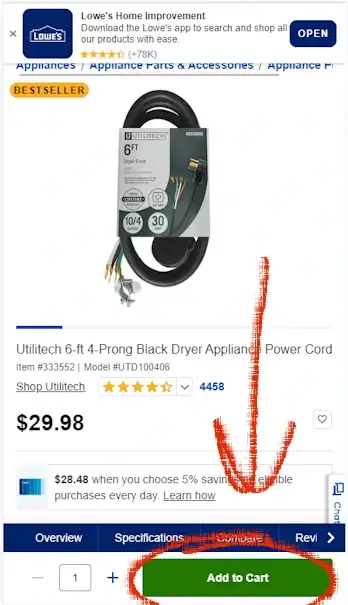
Step 1: Add an item to your cart
Browse to any product page and select Add to Cart.
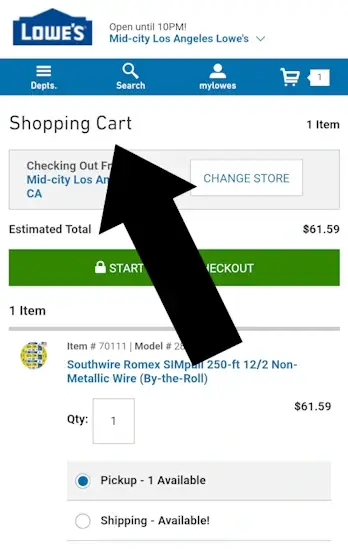
Step 2: Open your cart
Select View Cart to open your Shopping Cart page.
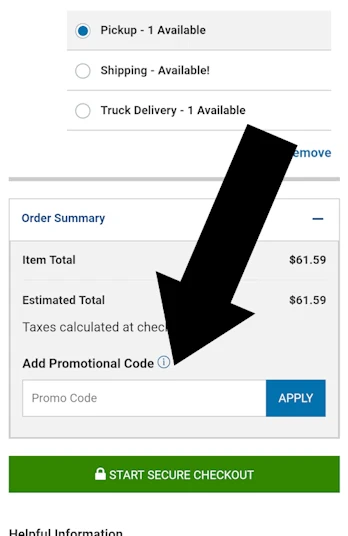
Step 3: Enter your coupon code
On the Cart page, scroll to the Order Summary section.
Select Add Promotional Code.
A box will appear. Paste your code and select Apply.
Key Takeaway
The coupon field is always in the Cart, not at final checkout.
Summary Steps
- Add an item to your cart
- Open your Cart page
- Select Add Promotional Code
- Paste your code and select Apply
Troubleshooting and FAQs
The Add Promotional Code link is not showing
Check these first:
- Make sure you are on the Cart page, not the checkout page.
- Scroll slowly, especially on mobile.
- Disable coupon extensions that may hide UI elements.
How to fix it:
Return to your Cart, scroll to Order Summary, and look for Add Promotional Code.
My Lowe’s coupon is not applying
Common reasons:
- The code is expired.
- Your cart includes excluded categories.
- You have not met the minimum purchase.
- The offer is in store only.
- The code is single use and already redeemed.
How to fix it:
Remove excluded items or add qualifying products, then try the code again.
The item is excluded from Lowe’s promotions
Lowe’s often excludes:
- Major appliances
- Gift cards
- Installation services
- Clearance items
- Certain seasonal categories
How to fix it:
Remove the excluded item or apply the code to eligible items only.
Can I use multiple Lowe’s coupons at once?
Lowe’s typically allows one promotional code per order.
Where do I enter a Lowe’s coupon on desktop?
Open your Cart and look above the order total.
Select Add Promotional Code, enter your code, and select Apply.
Where do I enter a Lowe’s coupon in the Lowe’s app?
Open your Cart, scroll to Order Summary, and select Add Promotional Code.
Does Lowe’s offer free shipping codes?
Occasionally. Most free shipping offers are tied to minimum purchase thresholds listed in the promotion details.
Still stuck? Contact us and we will test it for you.
Did this answer your question?

About Our Testing Process
WhereDoIEnterTheCoupon.com has been testing online retailer checkout flows since 2011. Every guide on this site is based on a checkout we navigated ourselves — on real orders, across desktop and mobile, retested whenever a retailer updates its UI. We document exactly where promo codes appear, what breaks them, and what to do when they fail. No guide is published from secondhand research. The Lowes website was last tested .
Test conditions used for this guide:
Windows Firefox
iOS Safari
Android Chrome
Guest checkout
Logged-in account
Full-price items
Sale items
Pre-order items
Related Guides
- Home Depot coupon code guide
- B&Q promo code guide
- Need help with another retailer? Browse our guides.