
How Do I Use a Coupon on Dunelm?
Time: 2–3 Minutes | Difficulty: Beginner | Tested by: Michael Tolley | Last tested:
Applying a voucher code on Dunelm is quick, but the voucher box is easy to miss if you haven’t checked out before. This guide walks you through the exact steps to find the Enter Voucher Code link on the Your Basket page, so you can apply your discount before paying.
What You'll Need
- A valid Dunelm voucher or promo code
- An item added to your Dunelm basket
- A working internet connection
- Your Dunelm account (optional, not required to use a voucher)
Key Takeaway
You can apply a Dunelm voucher on the Your Basket page by tapping the Enter Voucher Code link—no account required, and the discount appears immediately once the code is valid.
If you're new to online shopping discounts, check out our comprehensive guide.
How to Apply a Dunelm Voucher Code
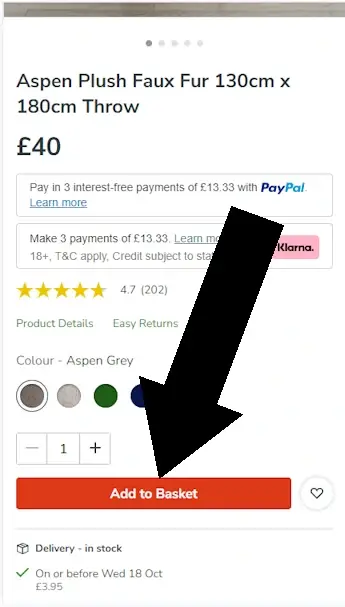
Step 1: Add Your Item to Basket
Navigate to the product you want and tap Add to Basket.
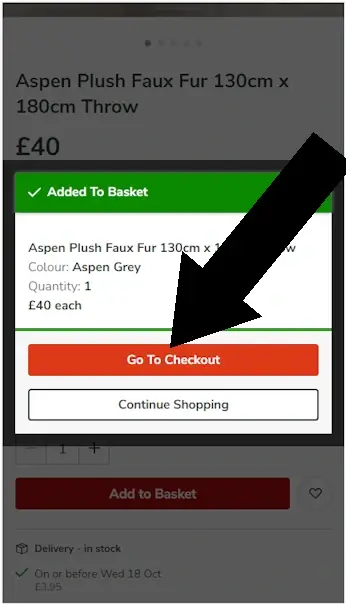
Step 2: Go to Checkout
A popup will appear confirming your item. Tap Go to Checkout.
Disclosure: We may earn a commission if you complete a purchase on Dunelm.com after using our guide. This never affects the steps, accuracy, or recommendations we publish. All information is based on independent testing and research conducted on .

Quick Reference Summary
- Voucher box appears on the Your Basket page
- Look for Enter Voucher Code under your items
- No login required
- Discount applies immediately after entering a valid code
- Works on eligible items only
Common Mistakes
- Entering codes with spaces
- Trying to stack multiple vouchers
- Using expired codes
- Applying codes to excluded categories
Did this answer your question?
Troubleshooting: Why Your Dunelm Code May Not Work
- Code expired - many Dunelm vouchers have short validity windows
- Minimum spend not met - some codes require a threshold
- Not valid on sale items - common restriction
- Category exclusions - e.g., furniture, made-to-measure, or branded items
- Code already used - some vouchers are single-use
- Spelling or spacing errors - codes are case-sensitive
Dunelm Coupon FAQ
Your Title Goes Here
Your content goes here. Edit or remove this text inline or in the module Content settings. You can also style every aspect of this content in the module Design settings and even apply custom CSS to this text in the module Advanced settings.
Where do I enter a voucher code on Dunelm?
On the Your Basket page. Scroll until you see Enter Voucher Code, then tap it to open the field.
Your Title Goes Here
Your content goes here. Edit or remove this text inline or in the module Content settings. You can also style every aspect of this content in the module Design settings and even apply custom CSS to this text in the module Advanced settings.
Can I use more than one voucher code?
No. Dunelm only allows one voucher per order.
Your Title Goes Here
Your content goes here. Edit or remove this text inline or in the module Content settings. You can also style every aspect of this content in the module Design settings and even apply custom CSS to this text in the module Advanced settings.
Does Dunelm offer sitewide codes?
Rarely. Most Dunelm vouchers apply to specific categories or promotions.
Your Title Goes Here
Your content goes here. Edit or remove this text inline or in the module Content settings. You can also style every aspect of this content in the module Design settings and even apply custom CSS to this text in the module Advanced settings.
Do I need a Dunelm account to use a voucher?
No. You can apply a voucher as a guest.
Your Title Goes Here
Your content goes here. Edit or remove this text inline or in the module Content settings. You can also style every aspect of this content in the module Design settings and even apply custom CSS to this text in the module Advanced settings.
Why is my Dunelm voucher not working?
Most codes fail due to expiry, minimum spend requirements, item exclusions, or incorrect entry.
Your Title Goes Here
Your content goes here. Edit or remove this text inline or in the module Content settings. You can also style every aspect of this content in the module Design settings and even apply custom CSS to this text in the module Advanced settings.
Can I use a Dunelm voucher in-store?
Only if the voucher explicitly states in-store eligibility. Most online codes are online-only.
Related Guides

About Our Testing Process
WhereDoIEnterTheCoupon.com has been testing online retailer checkout flows since 2011. Every guide on this site is based on a checkout we navigated ourselves — on real orders, across desktop and mobile, retested whenever a retailer updates its UI. We document exactly where promo codes appear, what breaks them, and what to do when they fail. No guide is published from secondhand research.