
Where Do I Enter a Target Coupon?
Time: 2–3 Minutes | Difficulty: Beginner | Tested by: Michael Tolley | Last tested:
Quick Answer
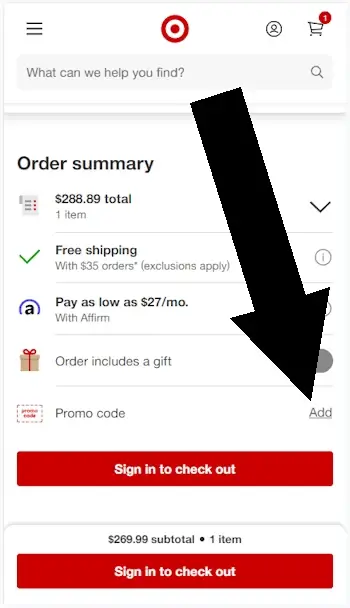
To enter a Target coupon on Target.com, go to your shopping cart and look for the 'Order Summary' section. You'll find a link to enter your promo code (formatted as TGTXXXXX). Note: Manufacturer coupons typically aren't accepted online. Only Target issued promo codes work at checkout.
What To Expect
This quick tutorial shows you exactly where to find the coupon entry field and how to apply your discount in 3 simple steps.
Time Required
Difficulty
How to enter a Target coupon
Step 1
Add an item to your cart
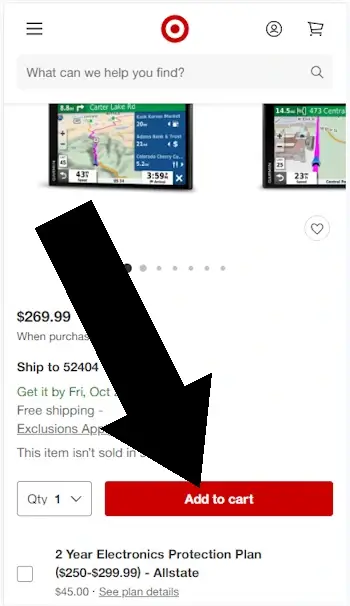
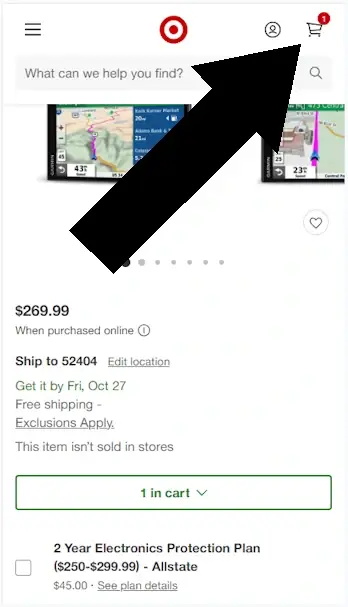
Step 2
When you are ready to checkout, click the cart symbol in the top right corner of your page.
Disclosure: We may earn a commission if you complete a purchase on Target.com after using our guide. This never affects the steps, accuracy, or recommendations we publish. All information is based on independent testing and research conducted on .
Did this answer your question?
Using Target.com Coupons
- Promo codes — Target releases online-only codes (usually in the TGTXXXXX format) that you enter during checkout for discounts, free shipping, or category-specific deals.
- Target Circle offers — Digital coupons you add to your Circle account; they apply automatically at checkout when the item qualifies.
- Target RedCard savings — Using a RedCard gives an automatic 5% discount on most online purchases without needing a code.
- Weekly Ad deals — Online versions of Target’s printed ads that include temporary price drops, BOGO offers, and category promotions.
Bottom Line
Target.com coupons are entered under 'Order Summary' inside the shopping cart. Look for the link before you login to your account.
Similar Tutorials
Since you read Where Do I Enter My Target Coupon, you may be interested in Where Do I Enter The Coupon at Walmart?

About Our Testing Process
WhereDoIEnterTheCoupon.com has been testing online retailer checkout flows since 2011. Every guide on this site is based on a checkout we navigated ourselves — on real orders, across desktop and mobile, retested whenever a retailer updates its UI. We document exactly where promo codes appear, what breaks them, and what to do when they fail. No guide is published from secondhand research.