
Where Do I Enter The Coupon on Newchic?
Time: 2–3 Minutes | Difficulty: Beginner | Tested by: Michael Tolley | Last tested:
Quick Answer
You enter a Newchic coupon code inside the Shopping Bag, under the Order Summary section. The field does not appear on the product page. Add at least one item to your bag, open the Shopping Bag, and the coupon box will be visible before checkout.
What You Will Need
- A valid Newchic coupon code
- A Newchic account or guest checkout session
- At least one item added to your Shopping Bag
How to Enter a Coupon Code on Newchic
Add your item to the Cart
Choose your size or color, then select ADD TO CART or BUY NOW. A confirmation popup will appear.
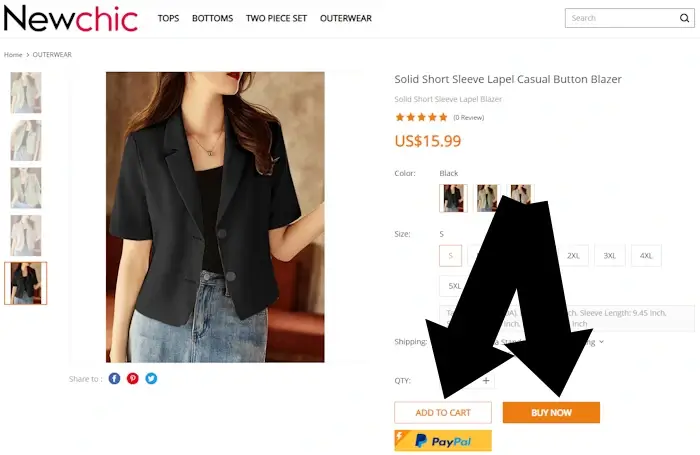
Screenshot taken
Go to your Cart
If you chose ADD TO CART, a popup will appear. Select View Cart. This opens the Shopping Bag page where the coupon field is located.
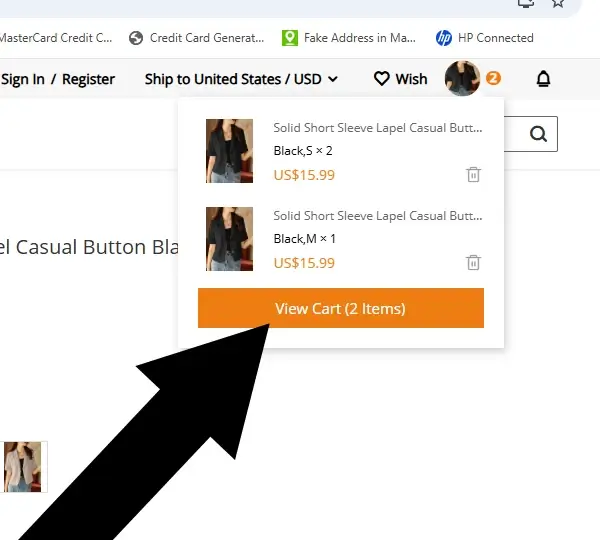
Screenshot taken
Tap 'Checkout Now'
Inside the cart, confirm your order then tap Checkout Securely Now.
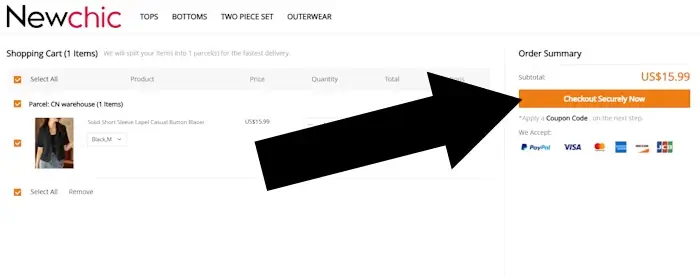
Screenshot taken
Enter your coupon code
Inside the Cart, scroll to the Order Summary section. You will see a field labeled Discount. Enter your code and select Apply.
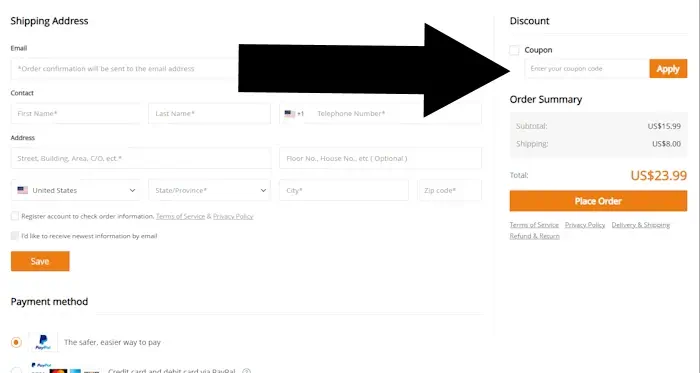
Screenshot taken
Tip: Confirm that the discount appears in your order total before you continue to payment.
Testing Notes
The steps in this guide were verified using the current Newchic layout. The coupon field appeared in the Cart without any issues during testing. If you use the BUY NOW button, you may skip directly from step 1 to step 4.
Troubleshooting Newchic Coupon Codes
Coupon field not showing
- Ensure you have opened the Cart; the field does not appear on individual product pages.
- Add at least one item to your bag to trigger the field.
- Refresh the page or clear your browser cache.
- If using the app, try switching to a mobile browser.
Code not applying
- Check for extra spaces when pasting the code.
- Confirm the code has not expired.
- Make sure your order meets the minimum spend requirement.
- Verify if items are already on sale, since many codes exclude clearance categories.
Apply button not responding
- Disable browser extensions that block scripts such as ad blockers.
- Try a different browser or device.
Discount disappears at checkout
Some codes only apply to specific eligible items. If a discount drops off, reopen the Cart and reapply the code to see which items qualify.
Frequently Asked Questions
Why can't I see the coupon code field on Newchic?
The field only appears once you have at least one item in your Cart. It will not show on product pages.
Can I use more than one coupon code per order?
Newchic typically allows one coupon code per order. Choose the code with the highest value.
My coupon code is not working. What should I check?
Verify that the code is active, meets minimum spend requirements, and applies to the items in your bag. Remove extra spaces and try a different browser if needed.
Can I apply a coupon after placing my order?
No. Newchic does not apply discounts after an order is completed. Always ensure the discount reflects in your total before clicking pay.
Does the coupon field appear before or after login?
You can see and apply the coupon field before logging in. You can apply a code as a guest during the initial Cart review.
Can I use a coupon on sale items?
Most Newchic coupons exclude sale items. Check the terms of your specific code to see if it allows stacking on discounted goods.
Where can I find working Newchic promo codes?
Check reputable coupon sites, Newchic promotional emails, or the Newchic homepage during seasonal events.
Still stuck? Contact us and we will test it for you. Or contact Newchic support directly.
Was this helpful?
Let us know how we can improve.
About Our Testing Process
WhereDoIEnterTheCoupon.com has been testing online retailer checkout flows since 2011. Every guide on this site is based on a checkout we navigated ourselves on real orders across desktop and mobile. We retest whenever a retailer updates its interface to confirm that the coupon field still appears where users expect it.
Our checkout verification process includes adding items to the cart, confirming that the Shopping Bag loads correctly, checking that the coupon field appears in the Order Summary section, and applying a code to verify that the discount updates the total. These steps are repeated on multiple devices to ensure consistent behavior.
We document exactly where promo code fields appear, what causes them to fail, and how to fix common issues. No guide is published from secondhand research. The NewChic website was last tested .
Test conditions used for this guide:
Windows Firefox
iOS Safari
Android Chrome
Guest checkout
Logged-in account
Full-price items
Sale items
Pre-order items
Also Shopping at Other Retailers?
- ASOS coupon code guide
- Macy's promo code guide
- Need help with another retailer? Browse our guides.