
Where Do I Enter The Coupon Code On QVC?
Time: 1–2 Minutes | Difficulty: Beginner | Last updated: | Tested by: Michael Tolley
Disclosure: We may earn a commission if you complete a purchase on QVC.com after using our guide. This never affects the steps, accuracy, or recommendations we publish. All information is based on independent testing and research conducted on .
Quick Answer
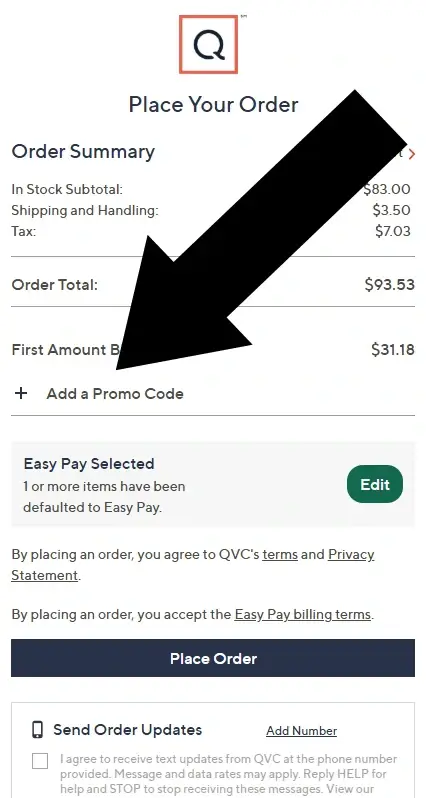
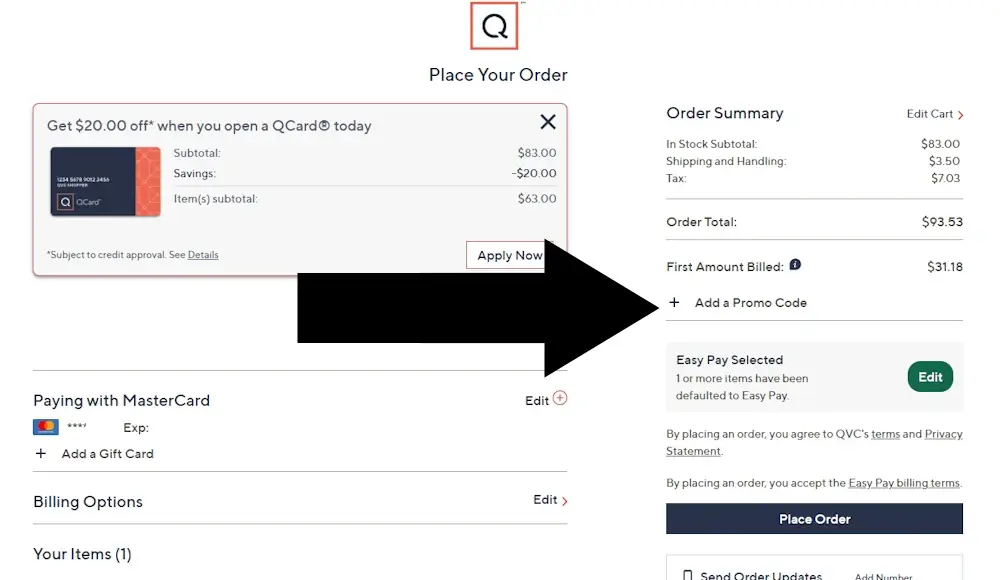
You can enter a QVC coupon code on the final Order Review page, after you’ve entered your email, billing address, shipping address, and payment method. The promo code field is hidden by default — click “+ Add Promo Code” in the Order Summary section to reveal it.
Before You Begin
- A valid QVC coupon or promo code
- QVC account (Required. While limited guest checkout now exists for select items, promo codes will only validate if you are signed into a registered QVC account.)
- Items added to your cart
- Payment method ready
Pro Tip (Important): Do NOT use Speed Buy, Apple Pay, or PayPal Express. These “instant checkout” buttons skip the Order Review page entirely — which means you will not see the promo code field. Always use the standard Checkout button.
How To Enter a QVC Coupon Code (Step-by-Step)
Step 1: Add to Cart
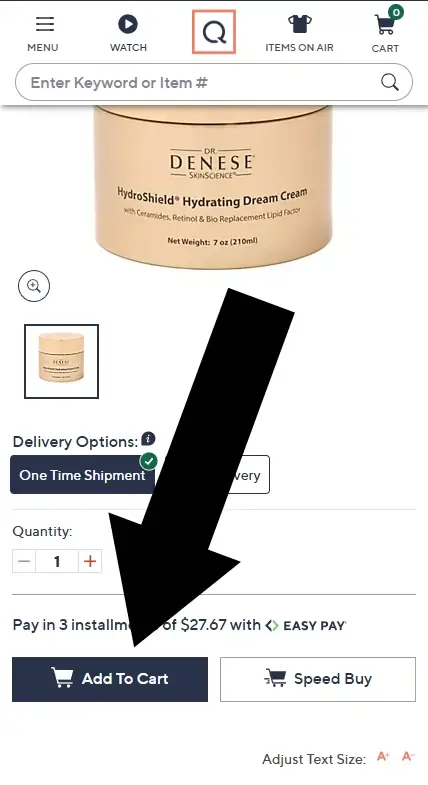
To enter a coupon on QVC, start on the product page, and click Add To Cart.
Step 2: Click Checkout
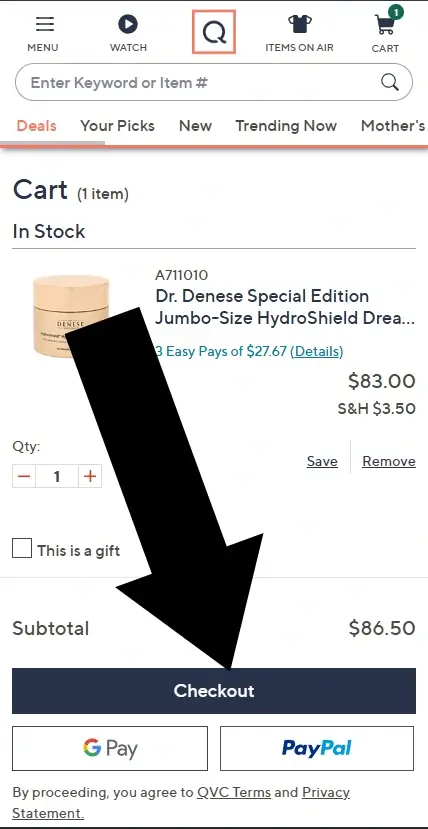
Inside your shopping cart review your order, and click Checkout.
Step 3: Enter Your Email
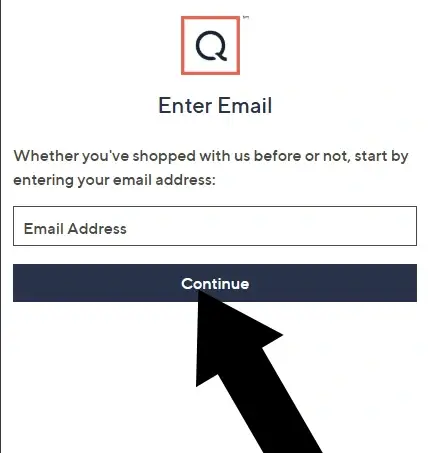
Begin by entering your email address. Click Continue.
Step 4: Complete Checkout Information
You'll be prompted to enter:
- Billing address
- Shipping address
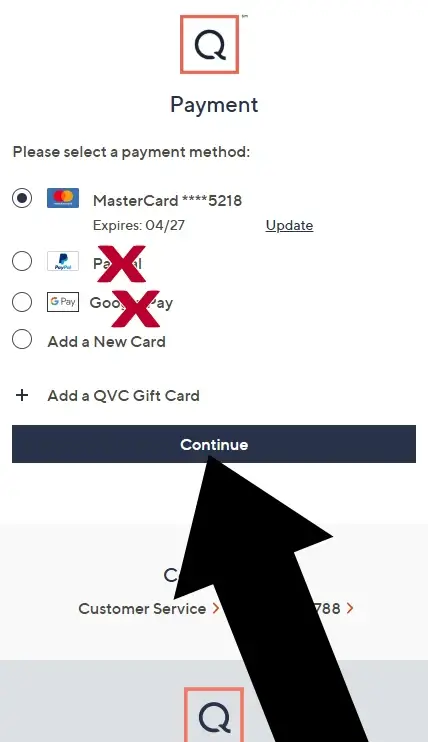
- Payment method
Click Continue after each section until you reach the Order Review page.
Note: If you are using Easy Pay, make sure your promo code is applied before you confirm the installment plan. Applying or changing a code can sometimes reset the number of available Easy Pay installments.
Summary
- Add an item to your cart
- Click Checkout — do not use Speed Buy, Apple Pay, or PayPal Express
- Log in with your QVC account (guest checkout will not accept promo codes)
- Enter your billing, shipping, and payment information
- On the final Order Review page, click "+ Add Promo Code" in the Order Summary section
Common Issues & Fixes
I can’t find the promo code box
It’s hidden by default. Look for “+ Add Promo Code” on the Order Review page.
My code isn’t working.
QVC codes often exclude:
- Lunchtime Specials
- As-Is items
- Today’s Special Value (TSV)
- Select premium brands (Birkenstock, Dyson, etc.)
Guest checkout won’t accept my code.
Correct — promo codes require a logged-in QVC account.
Easy Pay changed after I applied a code.
This can happen. Remove the code, reapply it, then reselect your installment plan.
More issues addressed in our Guide to Conquering Coupon Terms and Conditions
Frequently Asked Questions
Where is the promo code field on mobile?
Scroll to the bottom of the Order Review page. It appears under the order total.
Can I use more than one promo code?
No, QVC only allows one promo code per order.
Can I apply a promo code in the QVC app?
Yes, but the field is still on the Order Review screen. The steps mirror the mobile web flow, tap Checkout, complete your information, and look for the promo code link near the order total on the final screen.
Do QVC promo codes work on Easy Pay?
Yes, but apply the code before confirming your Easy Pay plan.
Was this helpful?
Let us know how we can improve.
QVC Coupon Report Card
| Category | Grade | Notes |
|---|---|---|
| Ease of Use | C | Promo code field appears very late in checkout |
| Checkout Flow | D | The promo code field appears at the very end of checkout, which remains a weak user experience. |
| Login Requirement | C | Limited guest checkout; login required early in the process |
| Exclusion Heavy | D | Many codes no longer apply to Lunchtime Specials, As-Is items, Today’s Special Value (TSV) offers, or select premium brands (such as Birkenstock and Dyson). If your code isn’t working, check whether your item is in one of these restricted categories. |
Conclusion
The QVC promo code field stays hidden until you click "+ Add Promo Code" in the Order Summary on the final Order Review page. If you never saw it, you likely used Speed Buy or Apple Pay; go back and use the standard Checkout button instead.
Code still not working? First, confirm you're signed into a registered QVC account. Then check whether your item is excluded: Lunchtime Specials, Today's Special Value, As-Is items, and brands like Dyson and Birkenstock commonly don't qualify.
More Ways to Save at QVC
- QVC Official Coupons — QVC's own coupon page, updated regularly with current promo codes and offers.
- Avoid Common Online Shopping Mistakes — Six things that cause shoppers to lose savings at checkout, based on 15 years of running a coupon site.
About Our Testing Process
WhereDoIEnterTheCoupon.com has been testing online retailer checkout flows since 2011. Every guide on this site is based on a checkout we navigated ourselves — on real orders, across desktop and mobile, retested whenever a retailer updates its UI. We document exactly where promo codes appear, what breaks them, and what to do when they fail. No guide is published from secondhand research.
Windows Firefox
iOS Safari
Android Chrome
Guest checkout
Logged-in account
Full-price items
Sale items
Pre-order items
MAP-restricted brands
Similar Tutorials
Looking for coupon instructions on other retailers? These guides show exactly where to enter promo codes.