
Where Do I Enter a Coupon on Expedia?
Trying to use an Expedia coupon code? This guide shows you exactly where to enter your promo code for hotels, vacation packages, and car rentals, with screenshots and step-by-step instructions.
How to Use an Expedia Coupon for Hotels
Step 1
Enter your dates and choose your hotel.
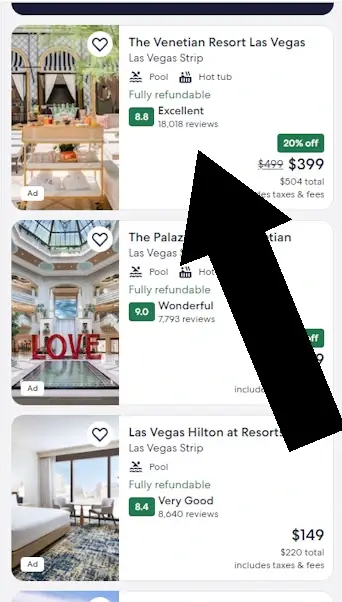
Step 2
Select the room you prefer.
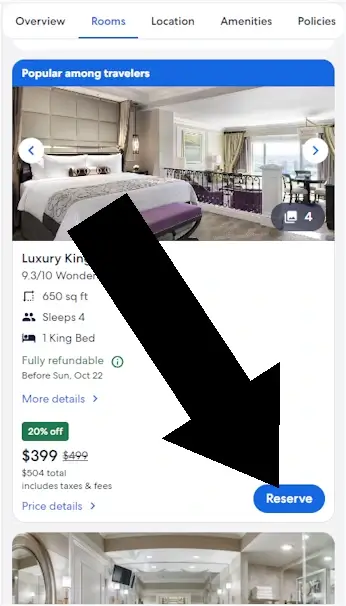
Step 3
During checkout, some properties require you to choose Pay Now before the coupon field appears. If you see this screen, select Pay Now to continue. Otherwise, proceed to the next step.
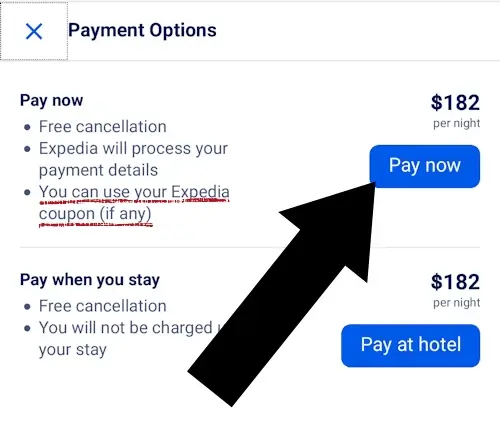
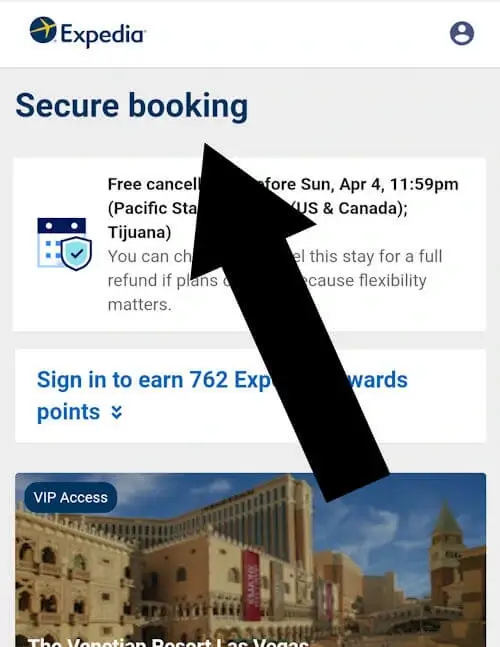
Step 4
Look for the Secure Booking page
How to Apply a Promo Code to an Expedia Vacation Package
Step 1
Choose your destination and dates, then pick your hotel and room.
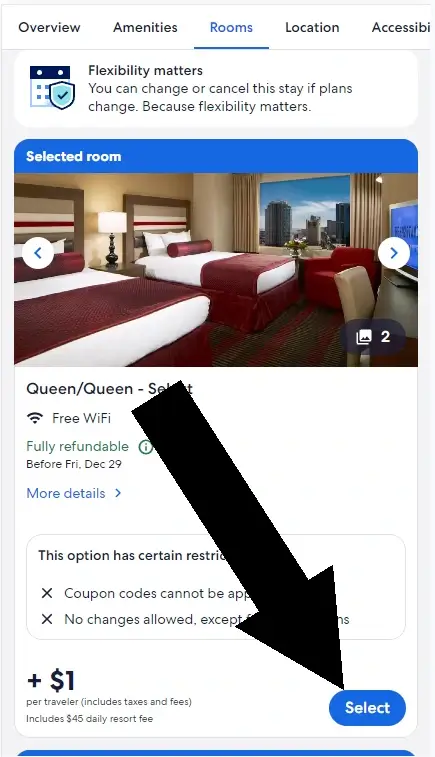
Step 2
Choose your flights
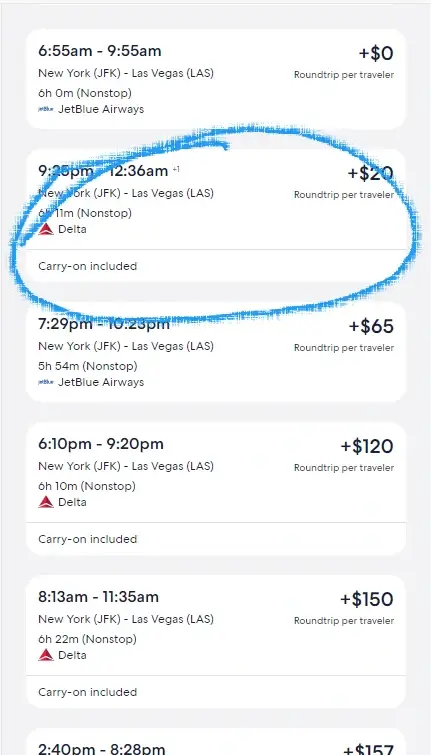
Step 3
Look for the link FINAL DETAILS and click it
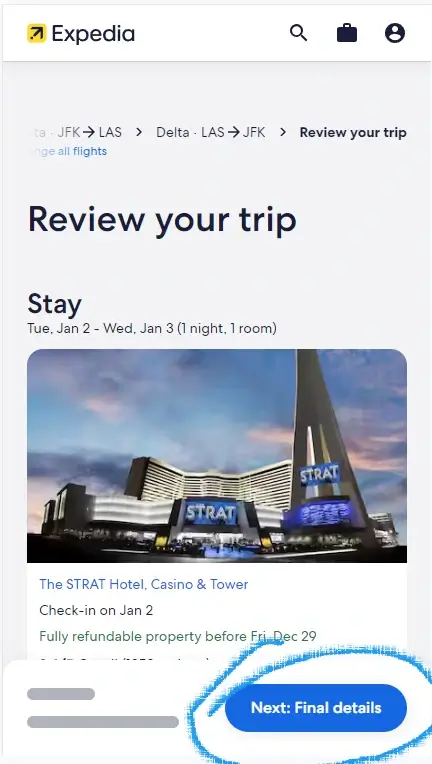
How to Enter a Car Rental Coupon on Expedia
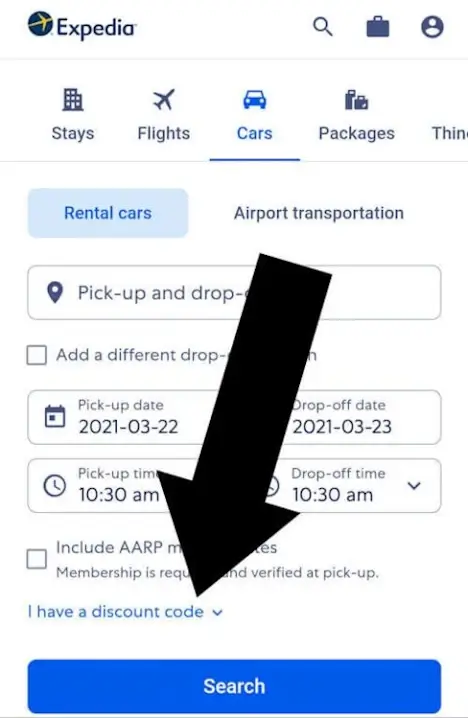
Step 1
- Click Cars
- Select I have a discount code
- Choose your rental company
- Enter your code
Tip: Car rental codes are company specific (Hertz, Budget, Enterprise, etc.).
Coupons Aren’t Supported for Flights
Expedia does not accept promo codes for flight-only bookings. This is a platform limitation — no coupon field will appear during flight checkout.
Promo codes not accepted for flights
Quick Answer: Where to Enter Your Expedia Coupon
Key Takeaways
- Expedia accepts coupons only for hotels, packages, and car rentals.
- The coupon field appears during checkout, not on the search page.
- Some hotels require “Pay Now” before the field appears.
- Car rental codes must match the rental company.
Troubleshooting: Why Your Expedia Coupon Isn’t Working
Common issues include:
- Expired code Check the expiration date
- Minimum spend not met Many require $200-$500
- Wrong booking type Hotel codes don’t work on packages
- Property not eligible Some hotels opt out
- Already used Most codes are one-time use
- Typo or extra spaces Codes are case-sensitive
Quick fixes:
- Clear browser cache
- Try a different browser or device
- Log out and back into your Expedia account
- Re-enter the code carefully
- Contact Expedia support if the code should work
More fixes in our Guide to Coupon Terms
Frequently Asked Questions
Why isn’t my Expedia coupon showing up?
Most often: expired code, minimum spend not met, or the hotel doesn’t accept coupons.
Can I use more than one coupon?
No. Expedia allows one promo code per booking.
Do coupons work in the Expedia app?
Yes, the coupon field appears in the same place during checkout.
Can I combine a coupon with Expedia Rewards points?
Yes. The coupon applies first, then you can redeem points.
Where can I find valid Expedia promo codes?
- Expedia’s official deals page
- Expedia Rewards emails
- Credit card travel portals
Avoid third-party coupon sites with outdated codes.
We Want to Hear From You
Did this guide help you apply your Expedia coupon?
Share your experience or ask a question using the contact form below.
About the Author
James Lowe specializes in breaking down online travel platforms like Expedia into simple, step-by-step instructions anyone can follow. His work is grounded in accuracy, hands-on testing, and a user-first approach that prioritizes clarity, accessibility, and trustworthy information.
Disclosure: We may receive a commission if purchases are made through Expedia.com. All findings are based on independent research and direct testing of the platform. Last tested on .
Similar Tutorials
Looking for coupon instructions on other retailers? These guides show exactly where to enter promo codes.

Is Expedia Worth It?

Where Do I Enter a Marriott Coupon?

Where Do I Enter The Coupon on Skyscanner?