
How Do I Use A Coupon At Belk?
Key Takeaway
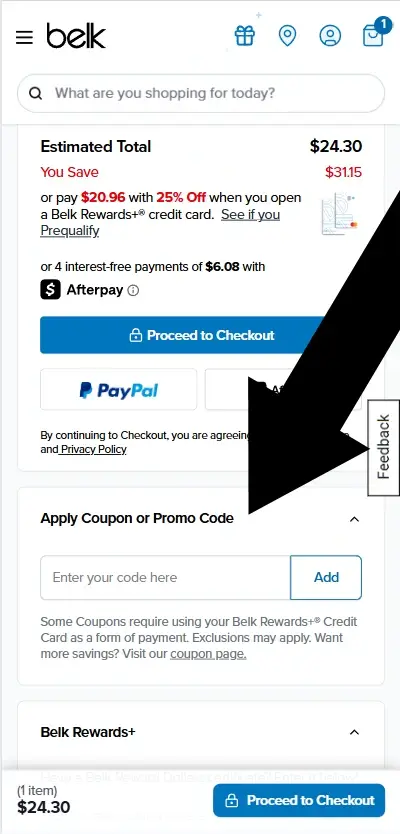
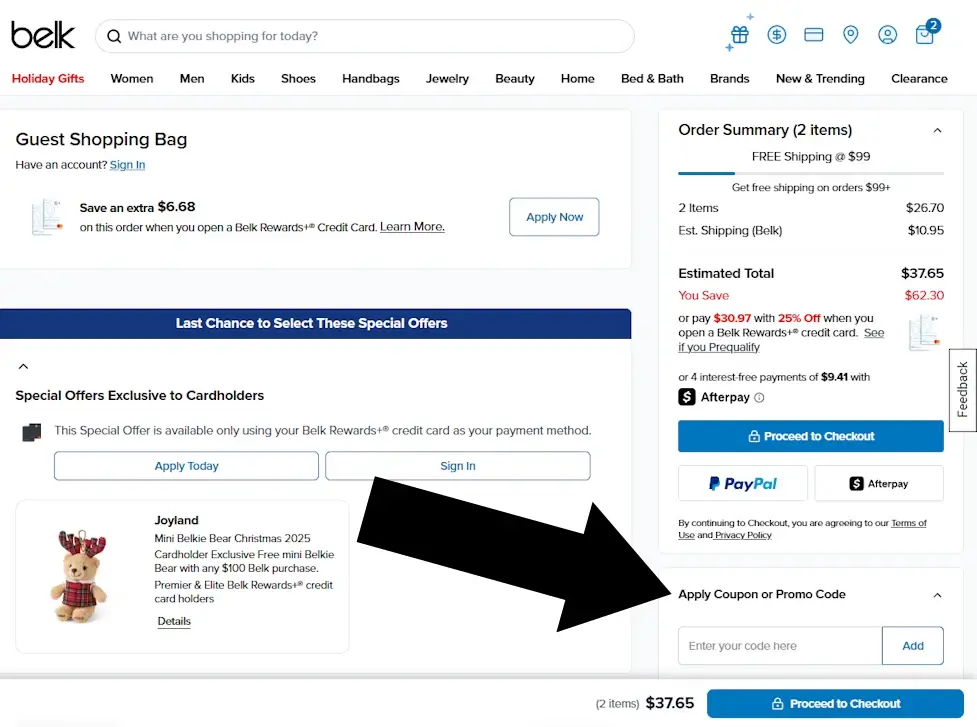
Belk promo codes are entered in your Shopping Bag, under the heading Apply Coupon or Promo Code, before you tap Proceed to Checkout. There is no place to enter a code after you leave this page.
What You'll Need
Before you begin, make sure you have the following ready:
- A valid Belk promo code
- An item added to your Bag
- (Optional) A Belk account if you want to save offers for later
Difficulty: Easy
Time required: Under 1 minute
How to Enter a Belk Coupon
Step 1: Add an Item to Your Bag
Browse Belk.com and add any eligible item to your Bag using the blue Add to Bag button.
Mobile
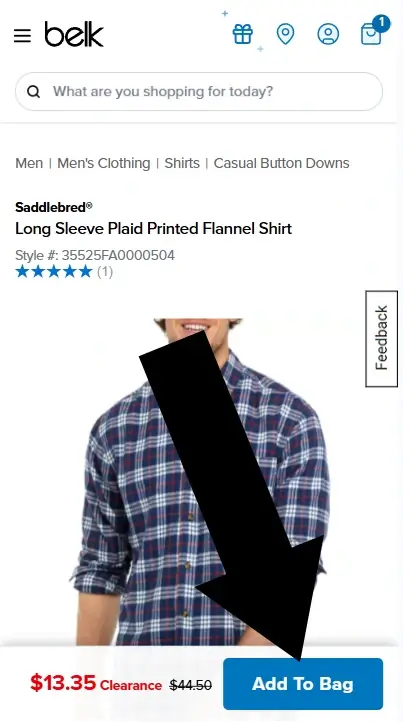
On mobile, tap the blue ADD TO BAG button on the product page.
Desktop
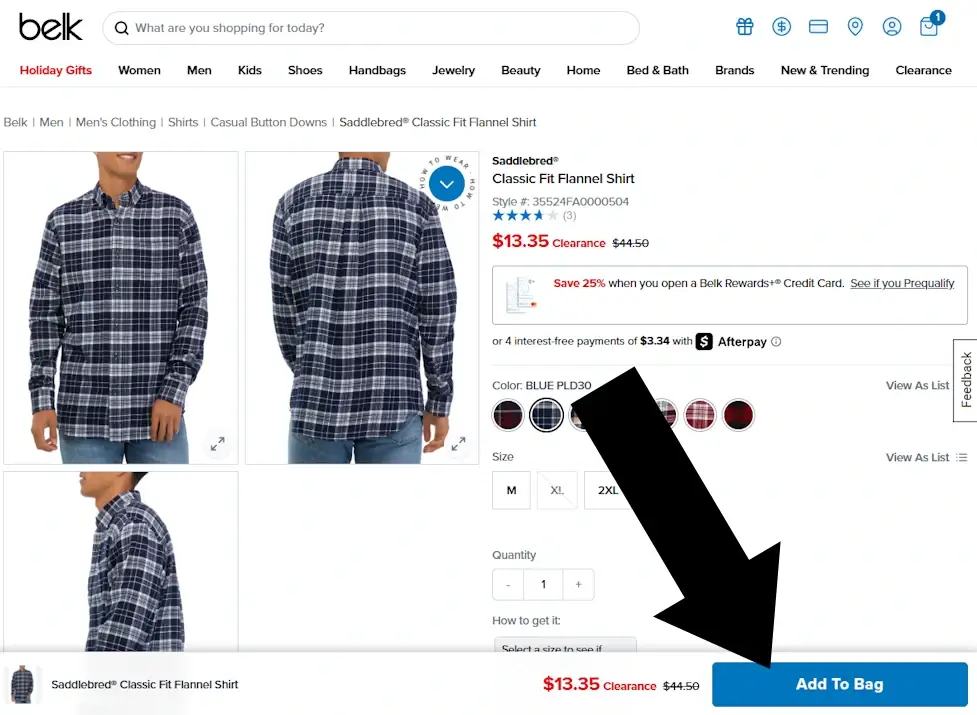
On desktop, click the blue ADD TO BAG button on the right side of the page.
Step 2: Open Your Bag
Once the item is added, a slideover panel appears with the option to view your Bag.
Mobile
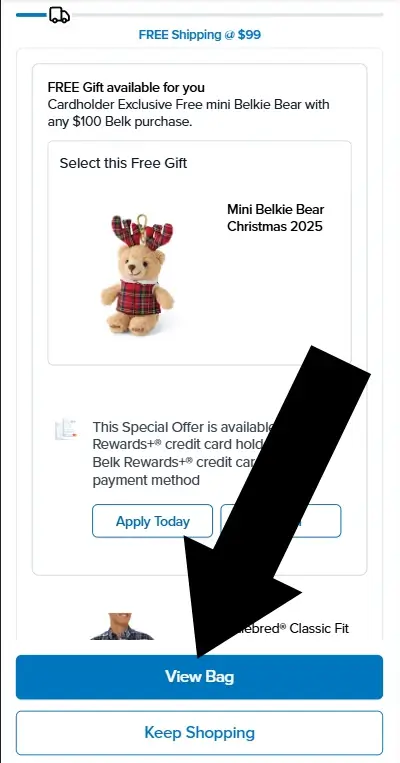
Tap VIEW BAG to open your Shopping Bag.
Desktop
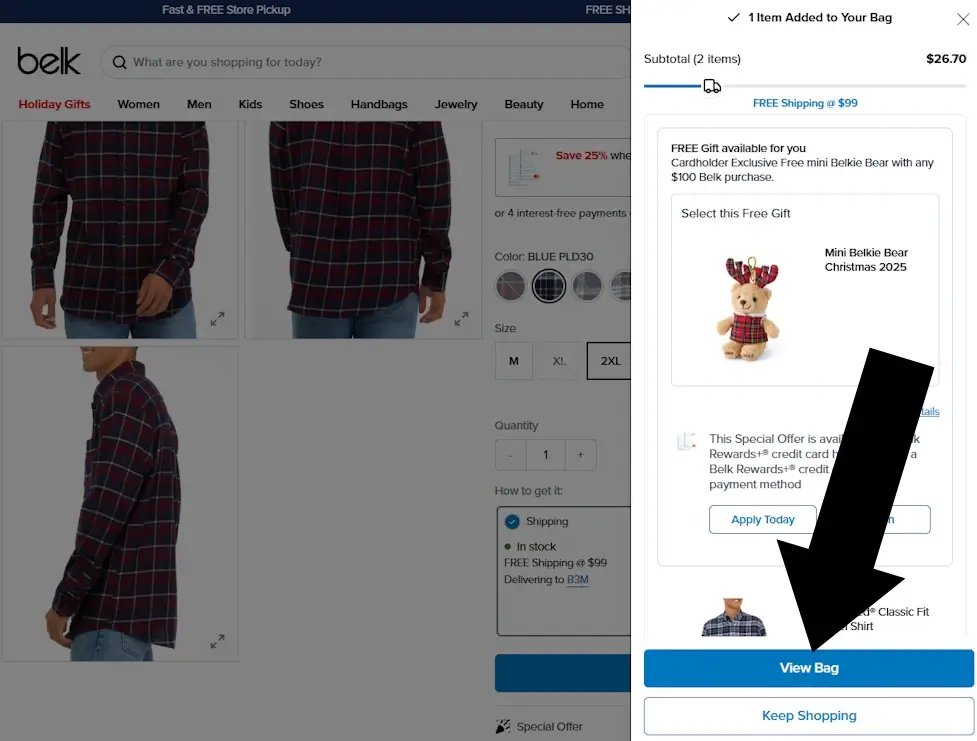
Click VIEW BAG to continue to your Shopping Bag.
Disclosure: We may earn a commission if you complete a purchase on belk.com after using our guide. This never affects the steps, accuracy, or recommendations we publish. All information is based on independent testing and research conducted on .
Summary: How to Use a Belk Coupon
Using a Belk coupon is a simple three step process:
Step 1: Add an item to your 'Bag'
Step 2: Tap 'View Bag'
Step 3: On the page with the heading 'Shopping Bag' look for the heading 'Apply Coupon or Promo Code'. Do this before tapping 'Proceed to Checkout'
Belk Coupon Pro Tips
| Issue / Tip | What It Means |
|---|---|
| No Login Required | Belk allows you to apply promo codes without signing in. |
| Apply Before Checkout | The coupon field appears only in the Shopping Bag. You cannot enter a code later in checkout. |
| Back Button Fix | If you continue without applying your code, use your browser’s Back button to return to the Shopping Bag. |
Frequently Asked Questions
Why isn’t my Belk coupon code working?
Most issues fall into one of these categories:
- The code has expired
- Minimum purchase not met
- Your items are excluded (cosmetics, designer brands, or certain sale items)
- The code is in-store only
- The code is single-use or tied to a specific account
- Check the offer’s terms and try removing excluded items from your Bag.
Can I use multiple coupons on one Belk order?
No. Belk allows only one promo code per order. However, you can often combine a promo code with Belk Rewards certificates or certain storewide promotions. If you have multiple codes, try each one in your Shopping Bag to see which gives the best discount.
Where do I find the coupon field?
The coupon field appears only in your Shopping Bag, not during final checkout. Tap View Bag and look for Apply Coupon or Promo Code before selecting Proceed to Checkout. If you’ve already moved ahead, use your browser’s Back button to return to your Bag.
Can I apply a coupon after placing my order?
No. Coupons must be applied before completing checkout. If you forgot to enter a code, contact Belk customer service at 1-866-235-5443 as soon as possible, they may be able to adjust the order if it hasn’t shipped.
Do I need a Belk account to use a promo code?
No. Belk allows promo codes during guest checkout. However, creating an account lets you save offers, track Belk Rewards, and access personalized promotions.
About Our Testing Process
WhereDoIEnterTheCoupon.com has been testing online retailer checkout flows since 2011. Every guide on this site is based on a checkout we navigated ourselves — on real orders, across desktop and mobile, retested whenever a retailer updates its UI. We document exactly where promo codes appear, what breaks them, and what to do when they fail. No guide is published from secondhand research alone.
Similar Guides
- Michael Kors coupon code guide
- prAna promo code guide
- Need help with another retailer? Browse our guides.