
Where to Enter an Orbitz Promo Code During Checkout
Time: 2–3 Minutes | Difficulty: Beginner | Tested by: Michael Tolley
Finding the promo code field on Orbitz can feel confusing if you have not gone through the full checkout flow. The promo code box only appears after you choose Pay Now and reach the Secure Booking page. Once you scroll to the Price Details section, you will see a link labeled Enter coupon or promo code. That link opens the field where you can apply your Orbitz promo code before completing your reservation.
This guide walks you through each step, shows where the promo code box appears, and includes troubleshooting tips based on real testing.
Disclosure: Some links on this page may earn us a commission if you make a purchase. This helps support our testing and guides at no cost to you.
What You Need Before You Start
- A valid Orbitz promo code
- A booking that qualifies for promotions
- A Pay Now option available for your room or package
- An Orbitz account if the offer requires one
- A few minutes to complete checkout
Tip: Orbitz promo codes do not apply to flights. They usually work only for hotels or packages that include a hotel.
How to Enter an Orbitz Promo Code
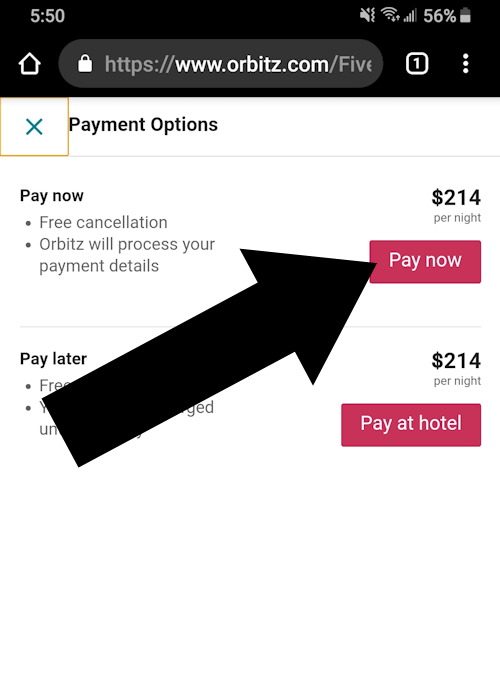
Step 1 - Choose Pay Now at Checkout
After selecting your room or package, Orbitz will show two payment options. Choose Pay Now. The promo code field will not appear if you select Pay at property.
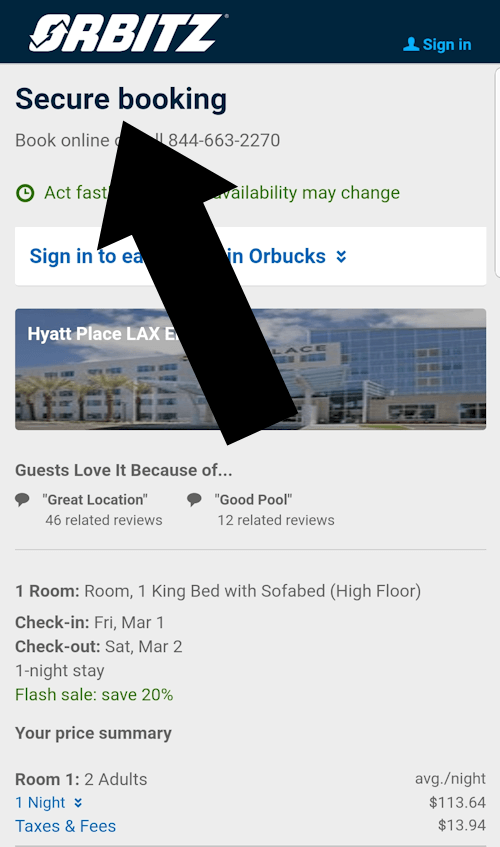
Step 2 - Continue to the Secure Booking Page
Orbitz will load a page titled Secure Booking. This is the page where all promo code fields appear.
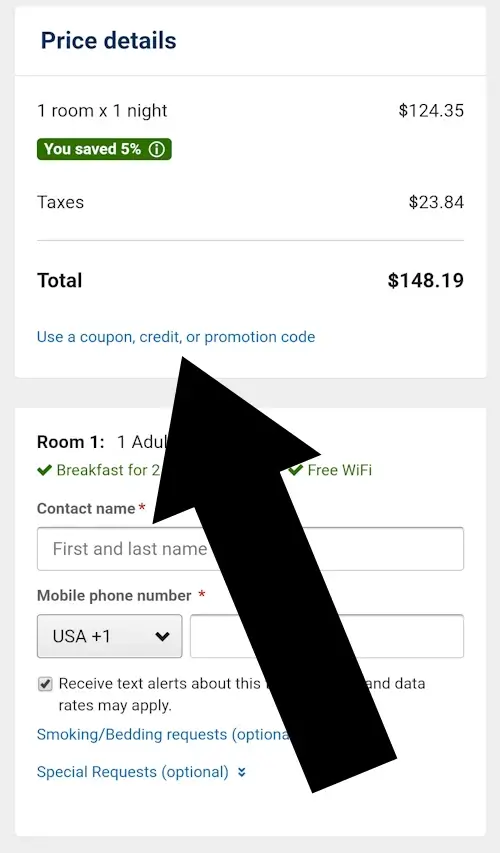
Step 3 - Scroll to the Price Details Section
Move down the page until you reach Price Details. Under the total price, you will see a link that says Enter coupon or promo code.
Troubleshooting
This usually happens when:
- You selected Pay at property
- You have not reached the Secure Booking page
- The page has not fully loaded
Fix: Choose Pay Now and reload the Secure Booking page. Scroll to Price Details again.
Common reasons include:
- The room or package is excluded from promotions
- The code has expired
- The code requires a minimum spend
- The code is limited to specific hotels or destinations
Fix: Check the fine print on the promo code source page and confirm your dates and room type qualify.
This can happen if:
- You remove an eligible item
- You change the room type
- You switch to Pay at property
- You adjust the number of guests
Fix: Return to the Secure Booking page, confirm Pay Now is selected, and reapply the code.
FAQ
Do Orbitz promo codes work on flights?
No. Orbitz promo codes typically apply only to hotels or packages that include a hotel.
Can I stack multiple Orbitz promo codes?
No. Orbitz allows only one promo code per booking.
Do promo codes work on mobile?
Yes. The promo code link appears in the same place on mobile, but you may need to scroll further to reach Price Details.
Do I need an Orbitz account?
Some promotions require you to be signed in. If a code is not applying, sign in and try again.
Did this answer your question?

About Our Testing Process
WhereDoIEnterTheCoupon.com has been testing online retailer checkout flows since 2011. Every guide on this site is based on a checkout we navigated ourselves on real orders across desktop and mobile. We retest whenever a retailer updates its interface to confirm that the coupon field still appears where users expect it.
Our checkout verification process includes adding items to the cart, confirming that the Shopping Bag loads correctly, checking that the coupon field appears in the Order Summary section, and applying a code to verify that the discount updates the total. These steps are repeated on multiple devices to ensure consistent behavior.
We document exactly where promo code fields appear, what causes them to fail, and how to fix common issues. No guide is published from secondhand research.
Test conditions used for this guide:
Windows Chrome
iOS Safari
Android Chrome
Guest checkout
Logged-in account
Full-price items
Sale items
Other Retailers We Have Tested
- Hotels.com coupon code guide
- Travelocity promo code guide
- Need help with another retailer? Browse our guides.