
Where Do I Enter My Amazon Coupon?
Time: 2–3 Minutes | Difficulty: Beginner | Tested by: Michael Tolley | Last tested:
Quick Answer
Amazon coupon codes are entered during checkout on the payment method page. Look for "Enter gift card or promotional code" below your credit card selection. The process takes 2-3 minutes.
What You Will Need:
- Amazon account (signed in)
- Valid coupon or promo code
- Items in your shopping cart
Amazon coupons can save you on purchases, but many shoppers can't find where to enter them. This guide shows you exactly where the coupon entry field is located and walks you through the 3-step process with screenshots.
**Important:** Unlike some retailers, Amazon requires you to enter your payment method BEFORE applying coupons. Don't worry, your card won't be charged until you confirm the order.
Step-By-Step Guide to Applying Amazon Coupons
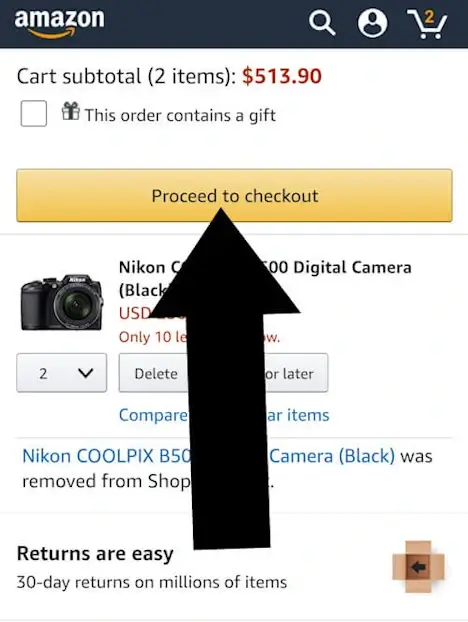
Step 1: Proceed to Checkout
First, confirm Your Selections and tap Proceed to Checkout
Step 2: Select a Payment Method
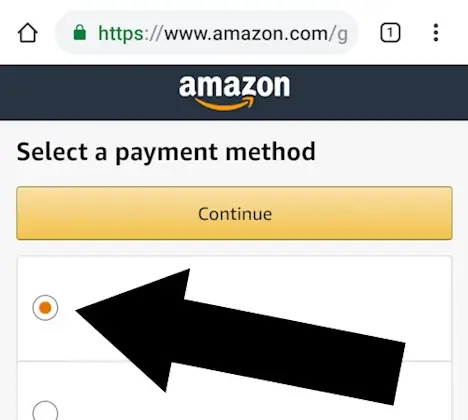
After clicking "Proceed to Checkout," you'll arrive at the payment selection screen.
**Action:** Choose your preferred credit card from the payment options.
Tip
Don't worry about entering your card first—you won't be charged until you confirm the final order.
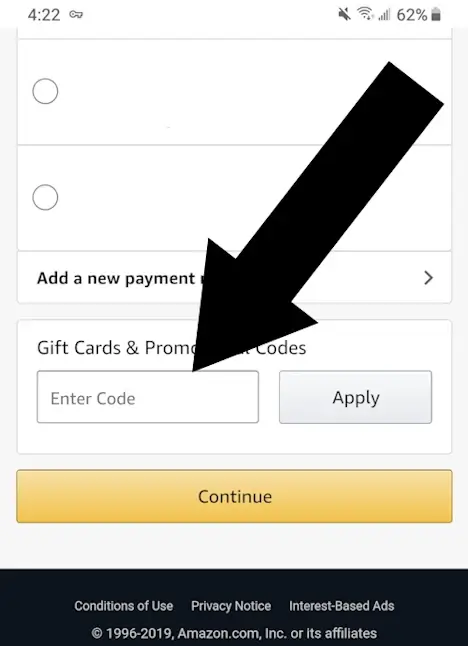
Step 3: Enter Your Gift Card or Promotional Code
Next, look for the expression “Enter gift card or promotional code”. Click this and a box will open where you enter the code.

Summary
1. Select ‘Proceed to Checkout’.
2. Navigate to the ‘Select a Payment Method’ section.
3. Proceed to Payment Options & input your gift card or promotional code.
Did this answer your question?
Troubleshooting Amazon Coupon Issues
I don’t see the “Enter gift card or promotional code” link
- Make sure you’re on the Select a payment method page.
- Amazon hides the field until you choose a payment method.
- Scroll down, the link is sometimes below the selected card.
- Expand any collapsed sections on the page.
My Amazon coupon code isn’t working
Common reasons:
- The code has expired
- The code only applies to specific items or sellers
- The item is sold by a third-party seller, not Amazon
- The code was entered with a typo
- The code is case-sensitive (copy/paste is safest)
The discount didn’t appear after clicking Apply
- Refresh the page and check the Order Summary again
- Remove the item from your cart and re-add it
- Try applying the code in a private/incognito window
- Make sure the item is sold and shipped by Amazon
Amazon asks for a credit card before showing the coupon field
This is normal.
Amazon requires a payment method before revealing the promo code box. You won’t be charged until you place the order.
I applied a gift card but don’t see the balance
- Check the Gift Card Balance section in your account
- Make sure you clicked Apply
- Reload the checkout page
- Confirm the code wasn’t already redeemed on your account
Amazon Coupon FAQ
Where do I enter my Amazon coupon?
During checkout, under Select a payment method -> Enter gift card or promotional code.
Can I enter multiple Amazon promo codes?
No. Amazon only allows one promotional code per order.
Do Amazon coupons expire?
Yes. Most Amazon promo codes have an expiration date or limited-time availability.
Do Amazon coupons work on all items?
No. Many codes only apply to:
- Items sold and shipped by Amazon
- Specific product pages
- Limited categories or brands
Why don’t I see the coupon box on mobile?
On mobile, the field is often hidden under: Payment Method -> Enter gift card or promotional code. Scroll down to reveal it.
Can I use a coupon and a gift card together?
Yes. Gift cards apply to your balance, and promo codes apply to the item.
Where can I find real Amazon coupons?
Authentic Amazon coupons appear on:
- Amazon product pages
- Amazon’s official Coupons page
- Amazon’s Today’s Deals section
Avoid third party sites claiming to offer Amazon promo codes.

About Our Testing Process
WhereDoIEnterTheCoupon.com has been testing online retailer checkout flows since 2011. Every guide on this site is based on a checkout we navigated ourselves — on real orders, across desktop and mobile, retested whenever a retailer updates its UI. We document exactly where promo codes appear, what breaks them, and what to do when they fail. No guide is published from secondhand research alone.
Similar Guides
- Lenovo coupon code guide
- Dell promo code guide
- Need help with another retailer? Browse our guides.